

Description
Build Private Store For WooCommerce lets you turn any WooCommerce shop into a fully private, members-only store in minutes. Whether you want to hide your entire website, lock down your WooCommerce store pages, or restrict only specific products, categories, tags, or pages — this plugin gives you precise, flexible control without writing a single line of code.
Guest visitors are seamlessly redirected to a login/registration page of your choice, and you control exactly what they can see, price or no price, button or no button.
🌟 Documentation | 🌟 Live Demo | 🌟 Get Pro | 🌟 Support
🔒 WHO IS THIS PLUGIN FOR?
- B2B / Wholesale stores that want to show pricing only to registered trade customers.
- Membership sites that restrict product access to paying members.
- Exclusive boutiques that need manual vetting before letting new customers browse.
- Multi-role WooCommerce stores that want different access rules for different user types.
- Any store owner who wants to add a login wall to products, categories, or their full site.
✅ KEY FEATURES
Three Privacy Modes
Choose exactly how much of your site to lock down:
- Whole Website — Every page requires login. Guest users are redirected to your chosen URL automatically.
- WooCommerce Store Only — Protect shop, product, category, tag, cart, and checkout pages while keeping the rest of your site publicly accessible.
- Selected Items Only — Pick individual products, product categories, product tags, or WordPress pages to restrict. Everything else stays public.
Login to See Price
Replace product prices with a customizable “Login to see prices” link for guest users. Works on product listing pages, single product pages, and WooCommerce block-based themes. The link text and color are fully customizable from the admin panel.
Hide Add to Cart Button for Guests
Completely remove the Add to Cart button for non-logged-in visitors on restricted products. The button is hidden in product loops, on single product pages, and even inside WooCommerce blocks — guests cannot add restricted items to their cart by any route.
Granular Product, Category, Tag & Page Restrictions
Use the built-in Select2 searchable dropdowns to choose exactly which products, product categories, product tags, or pages are restricted. Restricted items are also automatically excluded from Related Products, Upsells, and Cross-sells so guest users never stumble across a restricted product through a sidebar widget.
Manual User Registration Approval
Enable admin approval for new customer registrations. New users are placed in a “Pending” state and cannot log in until an administrator approves their account. Admins can Approve or Deny users directly from a clean dashboard inside the plugin, with full pagination and user search.
User Status Dashboard
A dedicated admin panel tab lists all registered users segmented by status — Pending, Approved, and Denied — with their name, email, avatar, and role. Approve or deny users with a single click. A custom “User Status” column is also added to the standard WordPress Users screen for at-a-glance management.
Fully Customizable Email Notifications
Control every email your store sends related to access management:
- Account Approved Email — Notify users when their account is approved (enable/disable, custom subject & body).
- Account Rejected Email — Notify users when their account is denied (enable/disable, custom subject & body).
- Admin Notification Email — Alert the site administrator when a user is approved or denied, with dynamic
{customer_name}placeholder support. - New User Registration Email — Send a welcome or confirmation email to new registrants immediately upon sign-up (enable/disable, custom subject & body).
Custom Login & Registration Form Titles
Replace the default WooCommerce “Login” and “Register” headings with any text you like, so your store’s branding stays consistent throughout the customer journey.
Custom Redirect URLs
Set separate redirect destinations for:
* Guest users who try to access a restricted product or page.
* Users who successfully log in.
Both fields accept any URL on your site, giving you full control over user flow.
Pending & Disabled Account Messages
Define the exact message shown to users whose account is still awaiting approval or has been disabled, displayed at the login screen so customers always know their status.
Custom Registration Success Message
Write a personalized message that appears after a new user completes registration — ideal for setting expectations around the approval process.
Cart Validation Protection
Even if a guest user somehow reaches the add-to-cart URL directly, a server-side validation hook prevents restricted products from being added to the cart. A descriptive error notice is displayed so the user understands why.
🔒 PRO VERSION FEATURES
1. Restrict by Private Categories
In the free version, the “Selected Items” mode lets you restrict individual products and pages. The Private Categories field in General Settings is locked behind Pro. With Pro, you can select entire WooCommerce product categories to privatize — every product belonging to the selected categories is automatically restricted for guest users, without having to list each product individually. This is essential for stores with large or frequently changing catalogues organized by category.
2. Restrict by Private Tags
Similarly, the Private Tags field in General Settings is a Pro-only feature. Pro users can restrict access to products by WooCommerce product tag, making it easy to mark any tagged subset of your catalogue as members-only — without touching individual product or category settings.
3. Customizable Account Rejection Email (Subject & Body)
While the free version lets you toggle the rejection email on or off, the Rejection Email Subject and Rejection Email Message fields are locked in the free plan. Upgrading to Pro lets you fully customize both the subject line and the body of the email sent to users when their registration is denied — so your rejection communication stays on-brand and gives customers clear next steps.
4. Customizable Account Approval Email (Subject & Body)
Likewise, the Approval Email Subject and Approval Email Message fields are Pro-only. Free users can enable or disable the approval email, but cannot edit its content. Pro users can write a fully personalized approval email — welcoming new members, sharing login instructions, or linking to exclusive content — giving a polished first impression the moment a customer is granted access.
⚙️ HOW IT WORKS
- Install and activate the plugin.
- Go to Private Store in your WordPress admin menu.
- Choose your privacy mode: Whole Website, WooCommerce Store, or Selected Items.
- If using Selected Items, search and select the products, categories, tags, or pages you want to restrict using the searchable dropdowns.
- Configure your redirect URLs, login-to-see-price text, and email notifications.
- Optionally enable Manual Approval to review every new registration before granting access.
- Save — your private store is live immediately.
Screenshots
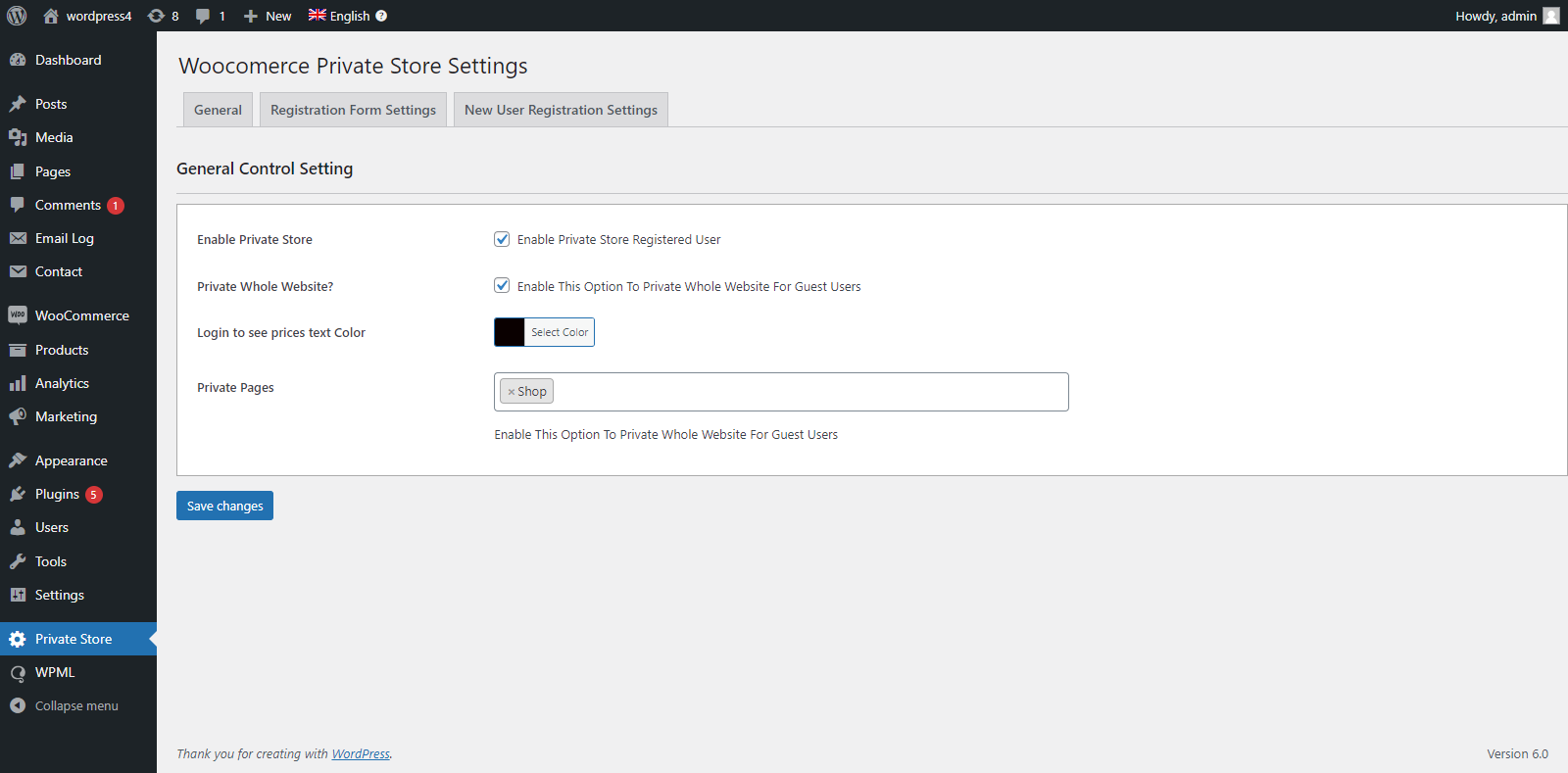
General Settings — Choose privacy mode, redirect URLs, and login-to-price options. 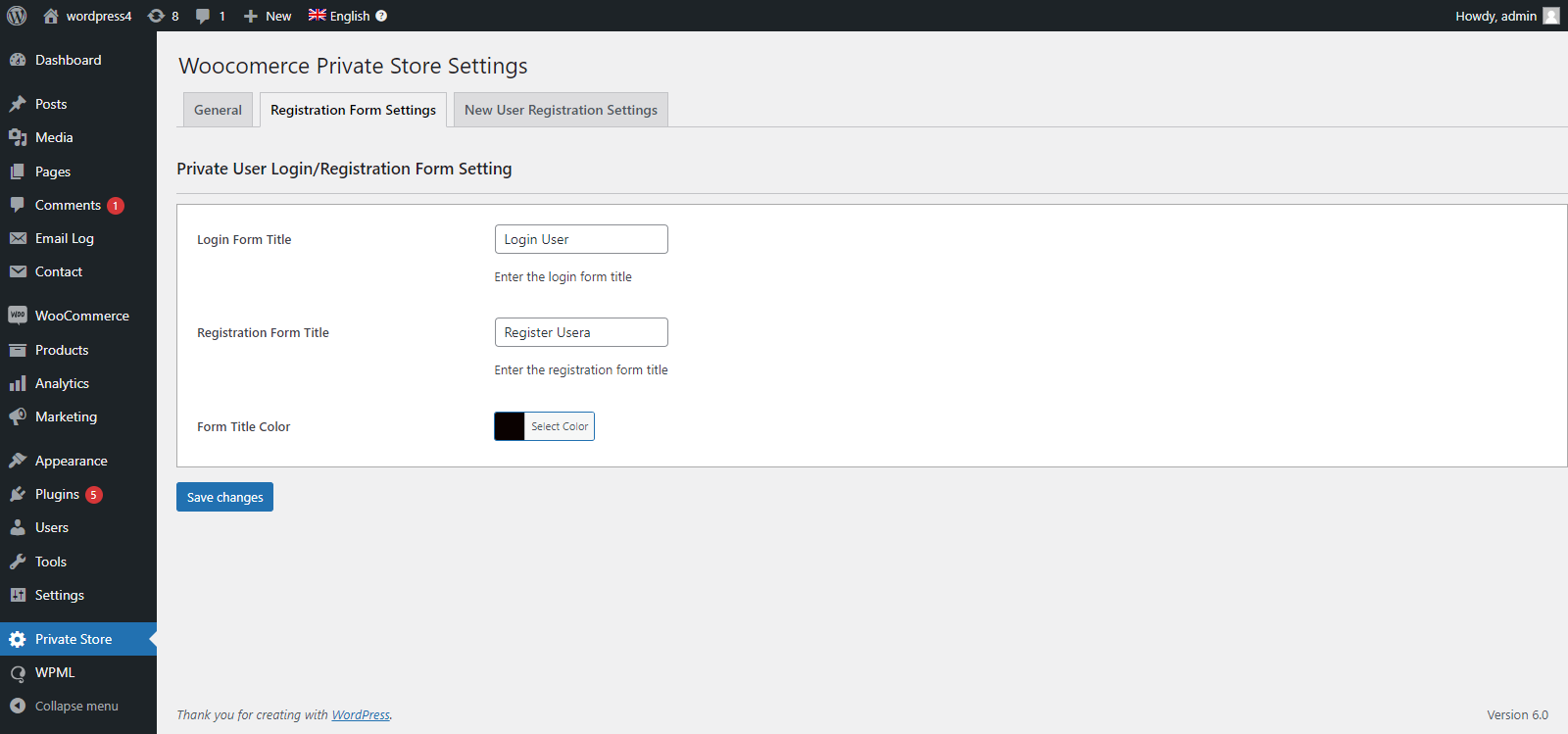
Registration Form Settings — Customize login title, registration title, and success message. 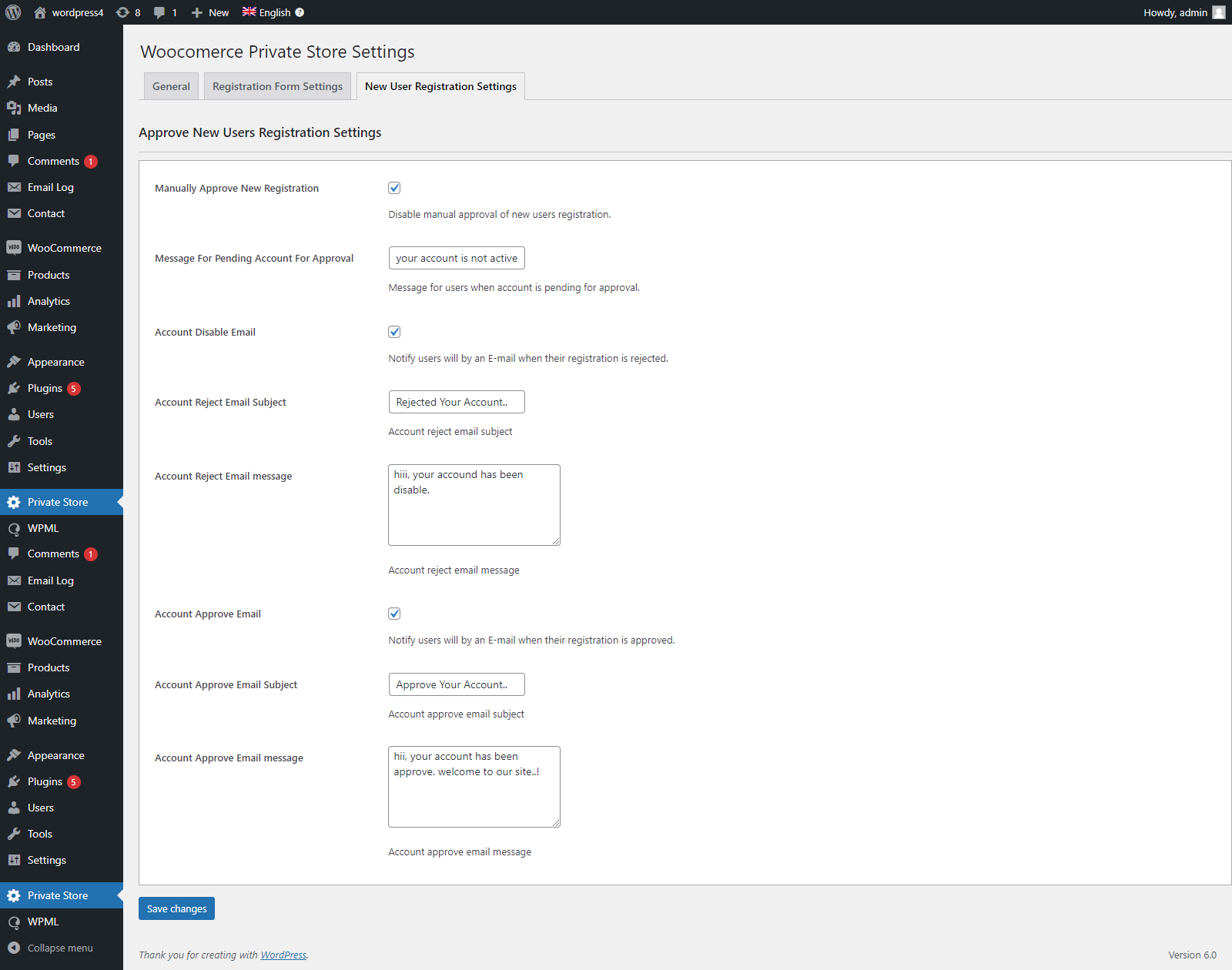
New User Registration Settings — Enable manual approval and configure pending/disabled messages. 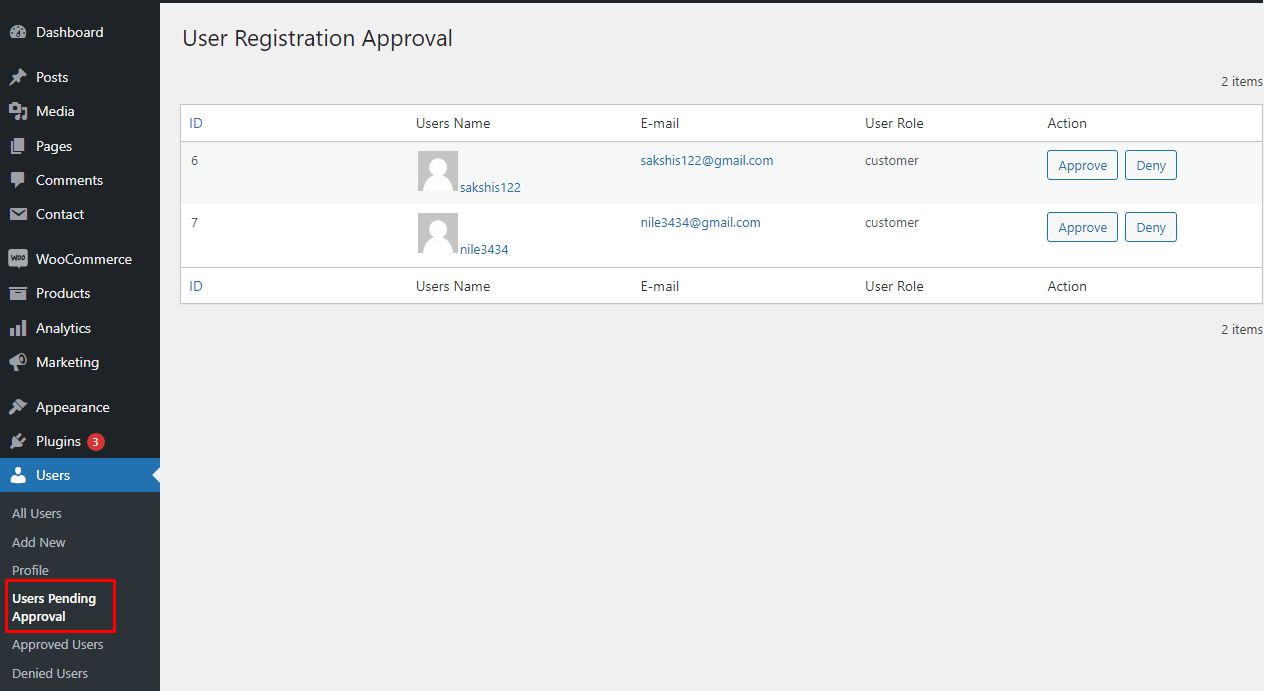
User Management Dashboard — View, approve, or deny pending user registrations with full pagination. 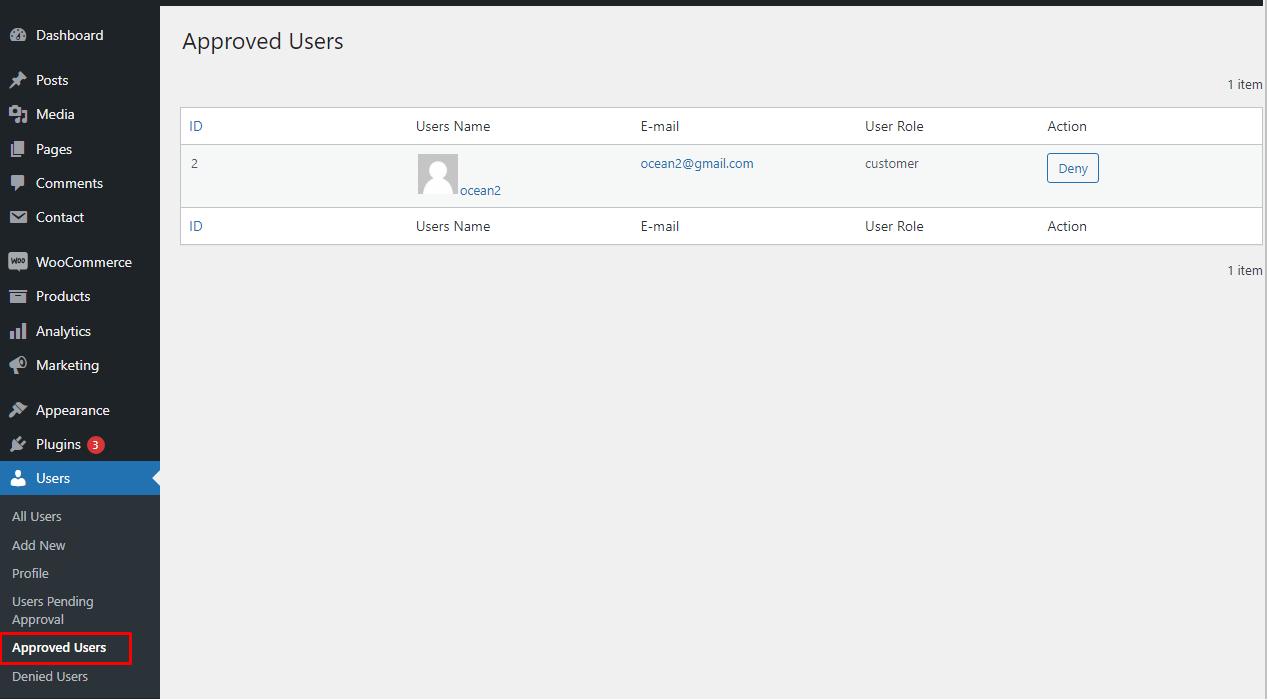
Approved Users — Browse all approved customers with their name, email, role, and avatar. 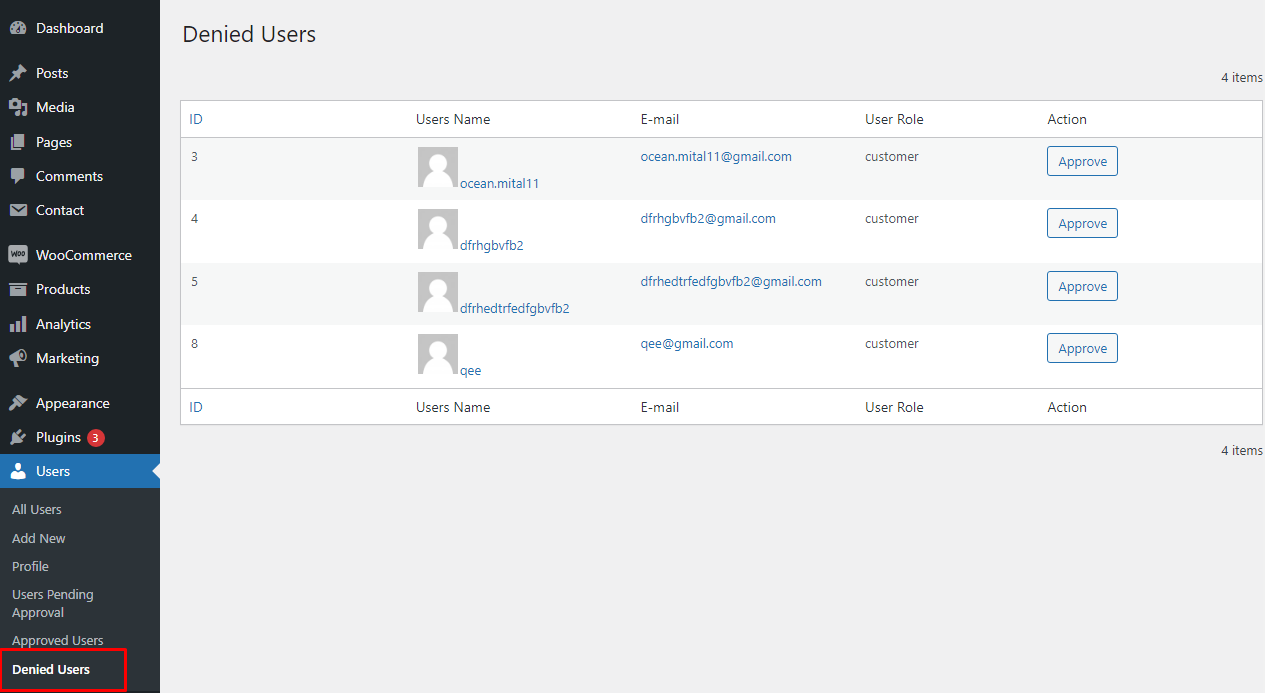
Denied Users — Manage rejected registrations from a dedicated filtered view.
FAQ
-
Can I restrict only specific products and leave the rest of my store public?
-
Yes. Choose the “Selected Items” privacy mode and use the searchable product selector to pick exactly which products, categories, tags, or pages are restricted. Everything else remains publicly accessible.
-
What happens when a guest user tries to view a restricted product?
-
They are automatically redirected to a URL of your choice — typically your login or My Account page. The redirect happens server-side before any page content is rendered.
-
Can I hide the price but still show the product?
-
Yes. Enable the “Login to See Price” option and the plugin replaces prices with a customizable login link. The product remains visible in listings, but the price and Add to Cart button are hidden for guest users.
-
Does the plugin work with WooCommerce block-based themes?
-
Yes. The plugin is compatible with block-based WooCommerce layouts and hooks into the WooCommerce product block to hide prices and remove Add to Cart buttons for guest users.
-
Can I manually approve new customer registrations before they can log in?
-
Yes. Enable “Manual Approval Required” in the New User Registration tab. New users will be placed in a Pending state and cannot log in until you approve them from the plugin’s User Management dashboard.
-
No. Restricted products, categories, and tags are automatically filtered out of Related Products, Upsell, and Cross-sell lists so guest users never encounter restricted items through secondary product recommendations.
-
Is the plugin compatible with the latest version of WooCommerce and WordPress?
-
Yes. The plugin is actively maintained and tested against the latest stable releases of both WooCommerce and WordPress.
-
Where can I get support?
-
Visit (https://www.plugin999.com/support/) to submit a support request. You can also leave a review on WordPress.org.
Reviews


Contributors & Developers
“Build Private Store For WooCommerce” is open source software. The following people have contributed to this plugin.
Contributors
Translate “Build Private Store For WooCommerce” into your language.
Interested in development?
Browse the code, check out the SVN repository, or subscribe to the development log by RSS.
Changelog
1.2
- Added Select2 searchable dropdowns for products, categories, tags, and pages.
- Added User Management Dashboard with paginated Pending / Approved / Denied views.
- Added admin notification email for approval and rejection actions with
{customer_name}placeholder. - Added WooCommerce block theme compatibility for price and Add to Cart button hiding.
- Added automatic exclusion of restricted items from Related Products, Upsells, and Cross-sells.
- Added server-side cart validation to prevent restricted products being added via direct URL.
- Added custom User Status column to the WordPress Users screen.
- Improved sanitization and nonce verification on all AJAX endpoints.
1.1
- Added three privacy modes: Whole Website, WooCommerce Store Only, Selected Items.
- Added manual user registration approval workflow.
- Added customizable Approve and Reject email notifications.
- Added custom login-to-see-price text with link.
- Added custom redirect URLs for guests and logged-in users.
1.0
- Initial release.