

Description
Tired of updating product images one by one? GURUALPHA Bulk Product Images Changer lets you update hundreds of product images in seconds — with gallery support, variation matching, and a full preview before you commit.
🚀 Why Store Owners Love It
- Save hours — Update 100+ products in one upload
- Zero mistakes — Preview every match before applying changes
- Full control — Main image, gallery, or both — you decide
- One-click undo — Revert any batch instantly if something goes wrong
✨ Key Features
📤 Upload Methods
* Drag & Drop — Drop images directly or click to browse
* CSV Import — Import from spreadsheet with external URLs
* Naming Conventions — SKU12345.jpg for main, SKU12345-gallery-1.jpg for gallery
🎯 Smart Matching
* Match by Product Title, SKU, or Product ID
* Automatic suffix detection (-main, -gallery, -1, etc.)
* Category and tag filtering — only match products you choose
🖼️ Image Management
* Multiple images per product — Main image + unlimited gallery images
* Variation support — Set images for variable product variations by SKU or attribute
* Gallery control — Choose main, gallery, or both for each upload
* Image compression — Auto-compress via TinyPNG or ShortPixel API
👀 Safety Features
* Preview before apply — See all matched products with thumbnails before committing
* One-click undo — Revert the last batch upload instantly
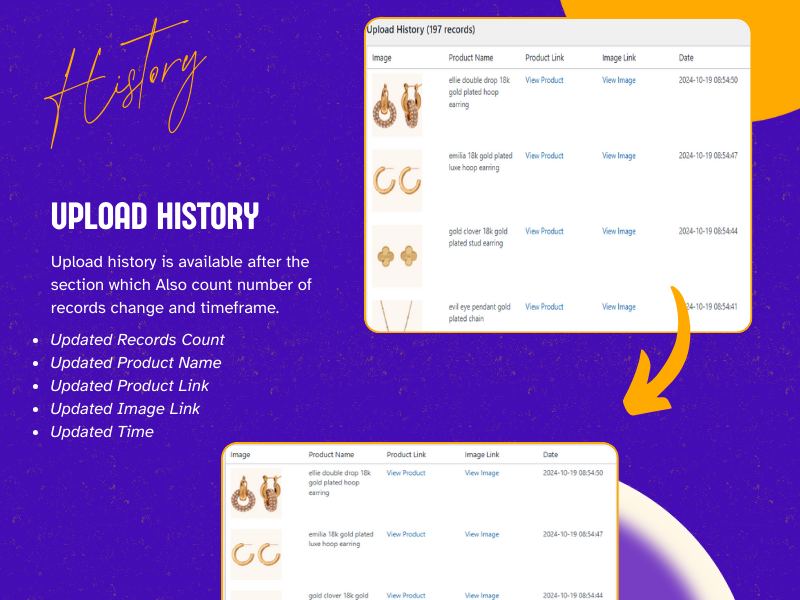
* Upload history — Full log of every change with product and image links
🌐 Enterprise Ready
* WordPress Multisite — Network activation, per-site or network-wide settings
* HPOS Compatible — Works with WooCommerce High-Performance Order Storage
* Network Admin — Manage API keys and settings across all sites
* Site-aware history — Track which site each change was made on
📊 Feature Comparison
Feature
GURUALPHA BIC
Basic Plugins
Premium ($49+)
Drag & Drop Upload
✅
✅
✅
Multiple Images Per Product
✅
❌
✅
Gallery Support
✅
❌
✅
Variation Image Support
✅
❌
✅
CSV Import
✅
❌
✅
Preview Before Apply
✅
❌
✅
Undo / Revert
✅
❌
❌
Image Compression
✅
❌
✅
Category/Tag Filter
✅
❌
✅
Multisite Support
✅
❌
❌
HPOS Compatible
✅
❌
✅
Price
FREE
Free
$49–$79/yr
📸 Screenshots
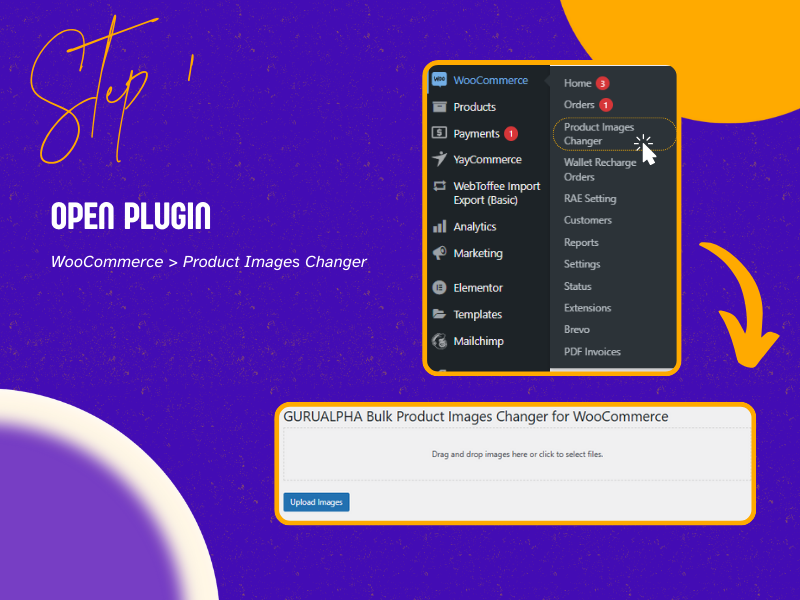
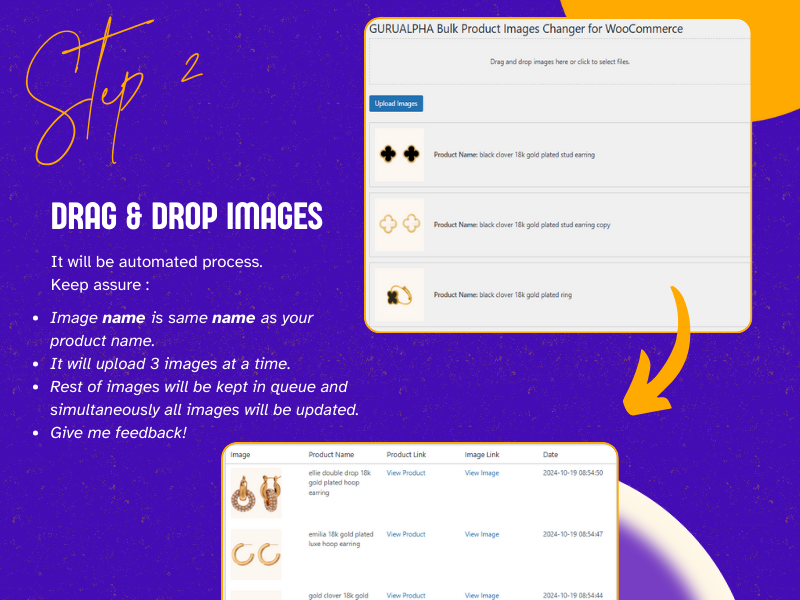
- Drag & Drop Upload — Simple drag-and-drop with settings panel for matching method, image role, and category filters.
- Preview Before Apply — Review all matched products with thumbnails before committing changes.
- Upload Progress — Real-time progress tracking with success/failure counts.
- Upload Results — Detailed results for each image with one-click undo option.
- CSV Import — Import images from spreadsheet with external URLs and preview.
- Settings & API Keys — Dedicated settings page for compression service, API keys, and preferences.
Screenshots
Installation
Option 1: Install from WordPress Admin
- Go to Plugins > Add New in your WordPress admin.
- Search for “GURUALPHA Bulk Product Images Changer for WooCommerce“.
- Click Install Now, then Activate.
Option 2: Upload Manually
- Download the
.zipfile from WordPress.org. - Go to Plugins > Add New > Upload Plugin.
- Choose the file and click Install Now, then Activate.
Option 3: WP-CLI
wp plugin install gurualpha-bulk-product-images-changer-for-woocommerce --activate
FAQ
-
How does multi-image matching work?
-
Name your files using this convention:
*SKU12345.jpgMain product image
*SKU12345-gallery-1.jpgGallery image
*SKU12345-gallery-2.jpgGallery imageOr upload multiple files with the same name and the plugin auto-assigns: first = main, rest = gallery.
-
How do I set variation images?
-
- Name files using the variation SKU:
VAR-SKU-RED.jpg - Select SKU as the matching method
- The plugin will match the image to the specific variation
- Name files using the variation SKU:
-
How do I use CSV import?
-
- Switch to the CSV Import tab
- Prepare a CSV with columns:
image_url,product_identifier,role(optional: main/gallery/both) - Drop the CSV or click to select
- Review the preview and click Import
-
How does the preview work?
-
Before uploading, click Upload Images to see a preview of all matched products. You can review each match and cancel if something looks wrong.
-
How do I undo a batch upload?
-
After an upload completes, click the Undo Last Batch button in the results section. This removes all images added in that batch and restores the previous images.
-
How do I compress images?
-
- Get a free API key from TinyPNG or ShortPixel
- Go to WooCommerce > Image Changer Settings
- Enter your API key and enable auto-compress
- The plugin will compress images automatically on upload
-
How do I filter by category or tag?
-
In the Upload Settings panel, select the categories or tags you want to filter by. Only products in those categories/tags will be matched.
-
What file types are supported?
-
JPG, PNG, GIF, and WebP.
-
Does this work with variable products?
-
Yes! The plugin can match images to specific variations by SKU or attribute combination.
-
Does this work with WordPress Multisite?
-
Yes! The plugin fully supports WordPress Multisite networks:
- Network Activation — Activate the plugin once for all sites
- Per-Site Settings — Each site can have its own API key and compression settings
- Network-Wide Settings — Optionally share API keys and settings across all sites via Network Admin > Settings > Bulk Image Changer
- Site-Aware History — Upload history tracks which site each change was made on
- Site Table — Network Admin shows a table of all sites with plugin/WC/API status
- New Site Auto-Setup — When network settings are enabled, new sites automatically get the shared API key
-
How do I enable network-wide settings?
-
- Go to Network Admin > Settings > Bulk Image Changer
- Check Enable network-wide settings
- Enter your API key and select compression service
- Optionally check Copy these settings to all existing sites
- Click Save Network Settings
-
Is this plugin free?
-
Yes! GURUALPHA BIC is 100% free with no hidden costs, upsells, or feature restrictions.
-
How do I get support?
-
Use the Feedback & Support form in the plugin settings, or visit the WordPress.org support forum.
Reviews


Contributors & Developers
“GURUALPHA Bulk Product Images Changer for WooCommerce” is open source software. The following people have contributed to this plugin.
Contributors
Translate “GURUALPHA Bulk Product Images Changer for WooCommerce” into your language.
Interested in development?
Browse the code, check out the SVN repository, or subscribe to the development log by RSS.
Changelog
4.2.0
- WordPress Multisite support — Network activation, per-site or network-wide settings.
- Network Admin settings page — Manage API keys across all sites from Network Admin.
- Site-aware history — Upload history tracks which site each change was made on.
- New site auto-setup — Automatically propagate settings to newly created sites.
- Active sites table — Network Admin shows plugin/WC/API status for all sites.
- Updated capability checks for network admin.
4.1.0
- Added feedback and support ticket form.
- Added quick links to WordPress.org support, reviews, and GitHub.
4.0.0
- Variation image support — Set images for variable product variations by SKU or attribute matching.
- Preview before apply — Review matched products with thumbnails before committing changes.
- CSV import mode — Import images from a spreadsheet with external URLs.
- Undo/Revert last batch — One-click revert for the last upload batch.
- Image compression — Auto-compress via TinyPNG or ShortPixel API integration.
- Category/tag filter — Only match products within specific categories or tags.
- Mode tabs — Switch between Drag & Drop and CSV Import modes.
- Variation badges — Visual indicators for variation vs. parent product uploads.
- Sample CSV download — Download a template CSV for import.
- Improved naming convention detection — Better suffix stripping for multi-image sets.
3.0.0
- Complete rewrite with WooCommerce dependency check, SKU/ID matching, gallery control, WebP support, HPOS compatibility, and security improvements.
2.2.4
- Enhanced auto-matching algorithms, improved error handling, optimized performance.