
Description
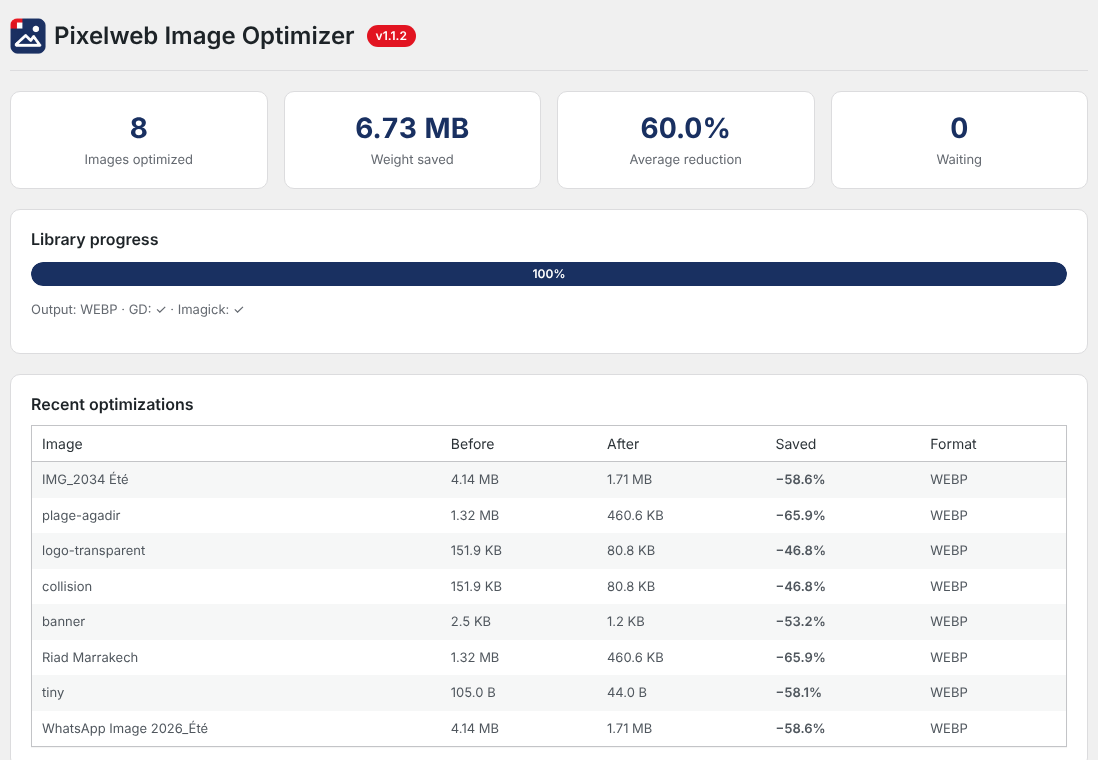
Pixelweb Image Optimizer makes your images lighter and your Core Web Vitals better without sending a single file to a third-party service. Everything runs on your server with the GD or Imagick library WordPress already uses.
What makes it different
- No account, no API key, no quota. Many image optimizers send your files to a paid cloud service with monthly credits. This one converts on your own server, as many images as you have.
- Speed and image SEO in one place. Conversion, lazy loading and an image SEO workflow (score per image, inline alt text editor, clean file names on upload) share one dashboard, built for agencies that hand sites over to clients.
- Safe with page caches and CDNs. WebP is served with standard <picture> tags, never by detecting the browser, so a cached page is right for every visitor.
- Protects the LCP. The first images of a page are never lazy-loaded, the setting is aligned with WordPress core, and nothing is loaded in JavaScript.
Lighter images, unlimited
- Automatic WebP copies of every new upload and every thumbnail size.
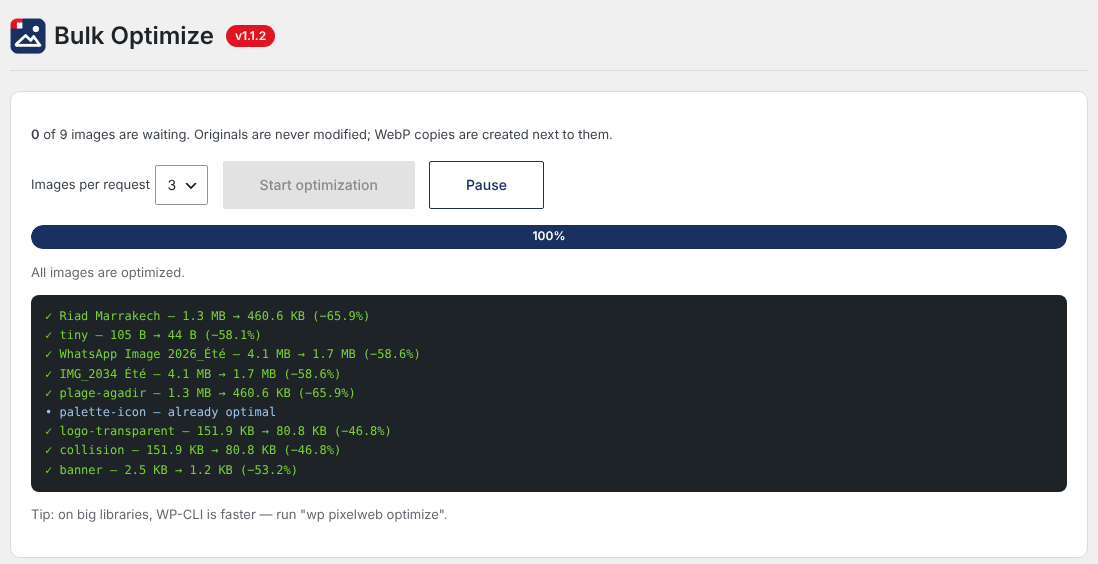
- Bulk optimization of your existing library — no monthly quota, no credits.
- Originals are never modified. WebP files are stored in their own folder,
uploads/pixelweb-image-optimizer/, which mirrors your media library (2026/10/photo.jpg.webp), sophoto.jpgandphoto.pngcan never overwrite each other. - A WebP that would be heavier than the original is thrown away automatically.
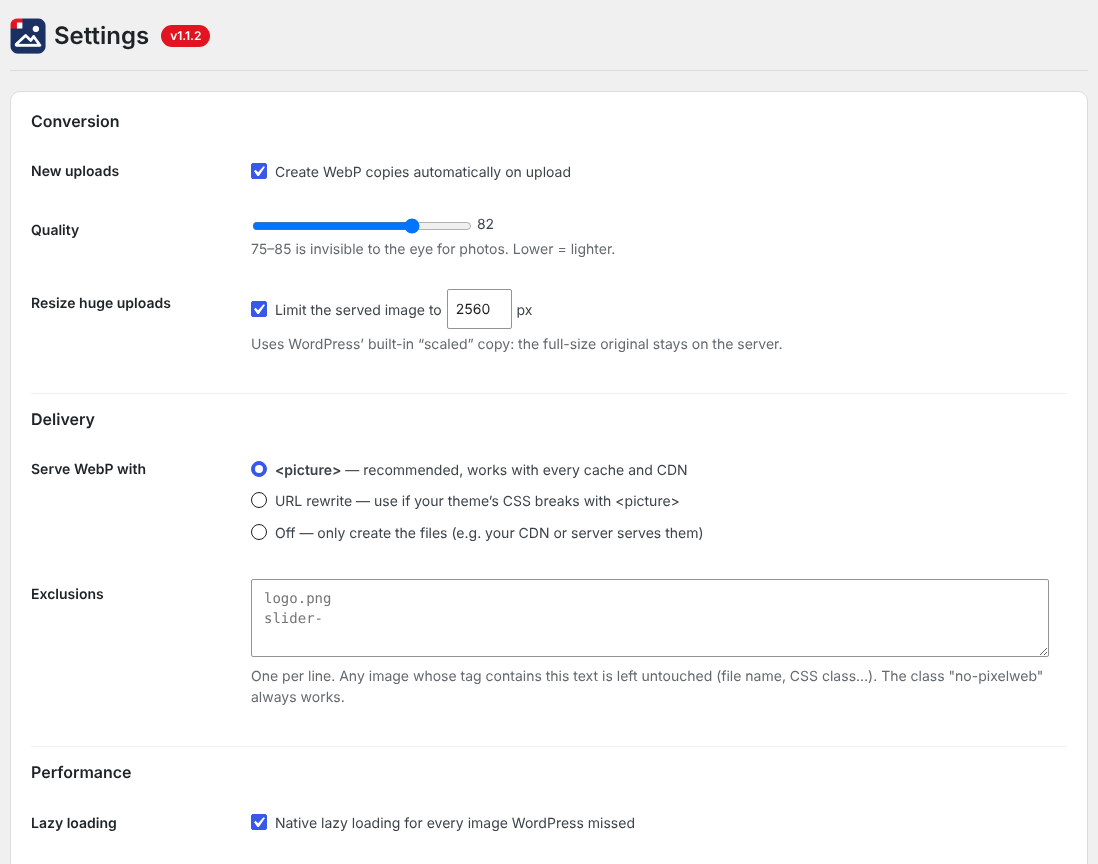
- Huge uploads are limited with WordPress’ own non-destructive “scaled” image.
Served the right way
- <picture> delivery (default): the browser chooses the format, so it works with every page cache, CDN and Cloudflare setup.
- URL rewrite mode for themes whose CSS does not like <picture>.
- Works with blocks, classic content, featured images, widgets, block theme templates and WooCommerce product galleries.
- Exclude any image by file name or CSS class (
no-pixelweb).
Core Web Vitals
- Native lazy loading (no JavaScript) for the images WordPress misses.
- LCP protection: the first images of the page are never lazy-loaded.
decoding="async"on every image.
Image SEO
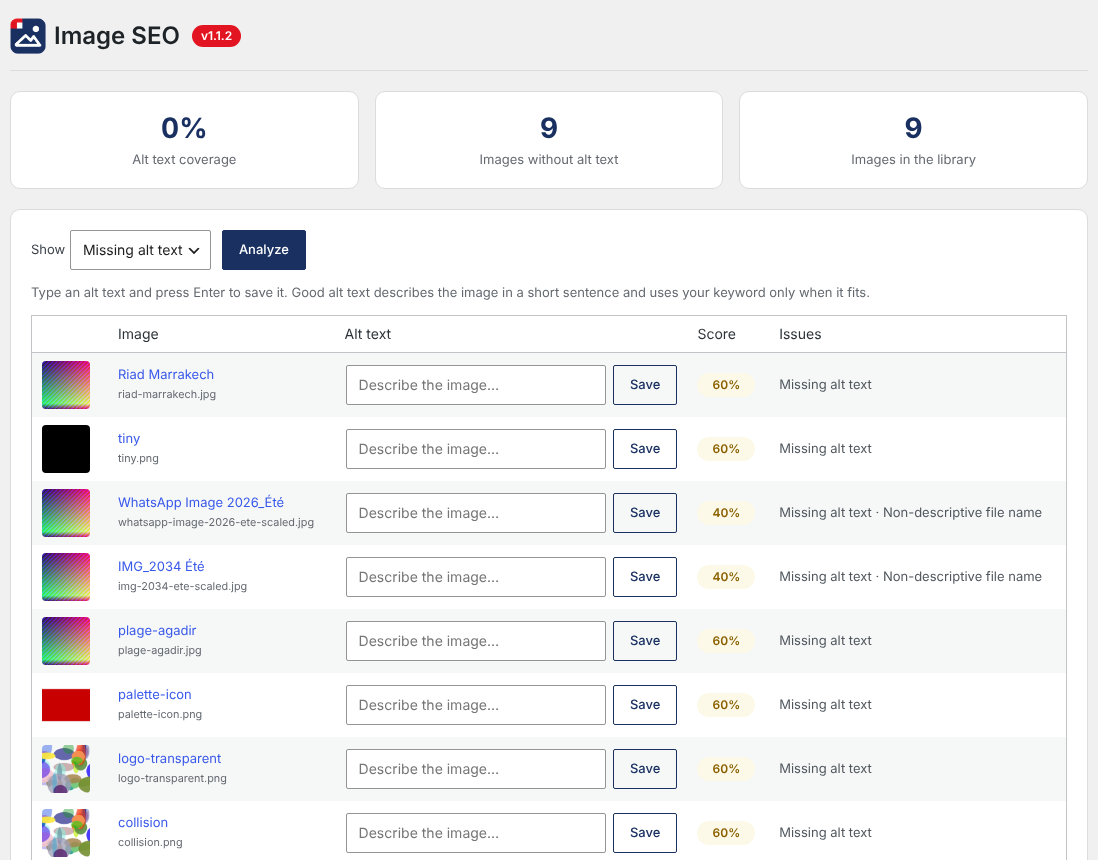
- SEO score for every image in the media library.
- Fast alt text editor: type, press Enter, next image.
- Detects missing or weak alt text, non-descriptive file names (IMG_, DSC, WhatsApp Image…), heavy files and oversized images.
- SEO-friendly file names on upload: “Photo Été_2024.JPG” becomes “photo-ete-2024.jpg”.
For developers and agencies
- WP-CLI:
wp pixelweb optimize,wp pixelweb status,wp pixelweb clean. - Filters:
pixelweb_quality,pixelweb_exclusions,pixelweb_delivery_filters,pixelweb_picture_sources. - Clean uninstall.
Pro add-on
A separate add-on, sold on our website and not hosted here, adds AVIF output, quality per image type, blur-up placeholders, automatic alt text and white-label client reports. This free plugin is complete on its own: nothing in it is locked, and it never limits the number of images.
Additional Information
Purpose
Pixelweb Image Optimizer reduces the weight of the images on a WordPress site and fixes their SEO, without sending files to an external service. It creates WebP copies on your own server, serves them to the browsers that support them, lazy-loads images below the fold and helps you write useful alt text.
Key features
- Automatic WebP conversion of new uploads and of every thumbnail size.
- Bulk optimization of the existing media library, with no quota.
- Two delivery modes: <picture> tags (default, safe with page caches and CDNs) or URL rewrite.
- Native lazy loading with protection of the first images (LCP).
- Image SEO score, inline alt text editor and SEO-friendly file names on upload.
- WP-CLI commands for large libraries.
Requirements
- WordPress 6.2 or later.
- PHP 7.4 or later.
- The GD or Imagick PHP extension compiled with WebP support. Most hosts provide it; the plugin dashboard shows what your server supports.
- Write access to the uploads folder (the same access WordPress needs to create thumbnails).
Compatibility
- Tested with WordPress up to 7.1.
- Works with classic and block themes, the block editor, widgets and WooCommerce product images.
- Works with page cache plugins and CDNs in the default <picture> mode.
- Multisite: settings and statistics are stored per site.
- Converted files are stored in
uploads/pixelweb-image-optimizer/, inside the uploads folder, so backup and migration plugins copy them with the rest of the media.
Configuration
- Open Pixelweb Settings.
- Keep the default quality (82) unless you need smaller files; between 75 and 85 the difference is hard to see on photos.
- Choose the delivery mode. Keep “<picture>” unless your theme’s layout changes, then switch to “URL rewrite”.
- Add exclusions (one file name or CSS class per line) for images that must never change, such as a logo or a slider.
- Open Pixelweb Bulk Optimize to convert the images you already have.
Troubleshooting
- The dashboard says WebP is not supported: ask your host to enable WebP in GD or Imagick. The plugin does not change anything until the server can write WebP.
- Visitors still receive JPEG or PNG files: purge your page cache and CDN after the bulk optimization, then check the page source for <picture> tags or “.webp” URLs.
- The layout of a page changed: switch Settings Delivery to “URL rewrite”, or exclude the image by file name or with the CSS class
no-pixelweb. - An image was skipped: the WebP version would have been heavier than the original, or the GIF is animated. Both are kept as they are on purpose.
- Something else goes wrong: enable
WP_DEBUG_LOGin wp-config.php, reproduce the problem and send us the lines mentioning “pixelweb” from wp-content/debug.log.
Support and documentation
- Plugin page and documentation: https://pixelweb.ma/landing-pixelweb-image-optimizer/
- Support for the free version: the support forum of this plugin on WordPress.org.
- Contact: contact@pixelweb.ma
- Publisher: PixelWeb
Limitations of the free version
- WebP output only. AVIF output is available in the separate Pro add-on.
- One quality setting for all image types.
- No blur-up placeholders, automatic alt text or white-label client report (Pro add-on).
- The free version has no limit on the number of images or sites and never sends data to an external server.
Screenshots
Installation
- Install from Plugins Add New, or upload the
pixelweb-image-optimizerfolder to/wp-content/plugins/. - Activate the plugin.
- Open Pixelweb Bulk Optimize to convert the images you already have. New uploads are converted automatically.
FAQ
-
Does it modify my original images?
-
No. WebP copies are created in
uploads/pixelweb-image-optimizer/. Removing them (Tools Remove generated files, or the uninstall option) brings your site back exactly as it was. -
Does it work with my cache plugin or CDN?
-
Yes. The default <picture> delivery puts both formats in the HTML and lets the browser choose, so the cached page is correct for every visitor.
-
My layout changed after activation.
-
Some themes style images with direct-child CSS selectors. Switch Settings Delivery to “URL rewrite”.
-
What does my server need?
-
PHP 7.4+ with GD or Imagick compiled with WebP support. The dashboard tells you if something is missing.
-
Is there a limit on the number of images?
-
No.
-
Does it send my images anywhere?
-
No. The plugin makes no external request.
Reviews

Contributors & Developers
“Pixelweb Image Optimizer” is open source software. The following people have contributed to this plugin.
Contributors
Translate “Pixelweb Image Optimizer” into your language.
Interested in development?
Browse the code, check out the SVN repository, or subscribe to the development log by RSS.
Changelog
1.1.2
- Changed: WebP files are now stored in their own folder, uploads/pixelweb-image-optimizer/, instead of next to the original images. Run Bulk Optimize once after updating to move existing files.
- Changed: the free plugin only contains WebP code. Add-ons can add formats through the new
pixelweb_picture_sourcesfilter. - Security: submitted settings are sanitized as soon as they are received, including the values passed on to add-ons.
- Changed: translations are delivered by translate.wordpress.org instead of being bundled.
1.1.1
- Fixed: a “critical error” could appear on the first front-end visit after activation, and once a day after that. The WebP support test called a WordPress function that is only loaded in the admin area. Visitors’ page views no longer run this test at all.
- Fixed: background tasks (WP-Cron) could stop for the same reason.
- Security: each AJAX action now verifies its nonce directly, before reading any submitted data.
- Changed: database queries on the statistics table use prepared identifiers.
- Changed: the “Exclusions” setting is stored under a new key. Existing exclusions are kept automatically.
- Improved: hook callbacks accept being called with fewer arguments by other plugins.
- Improved: updating from 1.0.0 outside the WordPress admin (FTP, WP-CLI) no longer triggers an error while PHP’s opcode cache still holds the old main file.
- Fixed: sites that started on version 1.0.0 kept an old database index, so one image could be counted several times in the statistics. The index is repaired automatically on update (duplicate statistic rows are merged, keeping the newest one).
1.1.0
- New: <picture> delivery compatible with page caches and CDNs.
- New: inline alt text editor and paginated SEO analysis of the whole library.
- New: SEO-friendly file names on upload.
- New: WP-CLI commands and Tools page.
- New: LCP protection for lazy loading.
- Changed: no more monthly limit; premium features moved to a separate add-on.
- Fixed: settings checkboxes could not be turned off.
- Fixed: photo.jpg and photo.png produced the same WebP file.
- Fixed: WebP files larger than the original were served.
- Fixed: palette PNG and GIF conversion with GD.
- Security: escaped image titles in the SEO table.
1.0.0
- Initial release.