
Description
WooCommerce checkout field editor and manager plugin helps to manage the checkout page fields in WooCommerce Store.
It’s drag and drop form builder helps editing checkout fields easier. It can use to add, modify or hide default WooCommerce checkout fields.
Try the Demo | Documents | Pro Version
HOW TO manage WooCommerce Checkout Fields?
After activating WooCommerce checkout field editor plugin, go to the menu WooCommerce >>Checkout Field in WordPress left menu bar.
Here you can manage all the fields available in WooCommerce and also you can add WooCommerce custom checkout fields
Check out our video demo on how this works:
Following Fields are supported
✅ Text Field – Input type text, Can use for single line texts
✅ Email Field – Input type email
✅ Password Field – Input type Password
✅ Phone Field – Input type telephone number
✅ Select Field – Input type select
✅ Textarea – Textarea checkout field, Can use for entering multiline texts
✅ Radio – Set radio fields to choose from
✅ Paragraph – Paragraph field can be used to show instructions on checkout fields, It can use to show messages in between checkout fields
✅ Header – Header fields can use to set html Header tag in woocommerce checkout fields, It provides h1 to h6 variations
✅ Checkbox Field – Input type Checkbox
✅ Number Field – Input type number
✅ URL Field – Input type url
✅ Toggle switch – switch field
CHECKOUT FIELD EDITOR FEATURES
👉 Edit Default Fields – Checkout field manager will help to edit the default woocommerce checkout fields
👉 Add new Fields – You can add new fields to checkout page
👉 Change Fields Order – It can drag and adjust the fields position,
👉 Hide Checkout Fields – It can hide the default WooCommerce checkout fields
👉 Enable or Disable Checkout Fields – It can Enable or Disable WooCommerce checkout fields
👉 Show in Order Details – Checkout fields filled by customer can be view on order details
👉 Show in Email Details – WooCommerce Checkout fields submitted by customer can be view on order emails
👉 Adjust the column width – It can adjust to show fields in half width or full width in checkout page
👉 Set Custom CSS class – It can set custom css class for individual checkout fields
👉 WPML and Polylang support – Multilingual plugins WPML and Poly lang is supported
DEMO – CHECK THIS OUT IN REAL
🔗 Front end Demo
🔗 Backend Demo
PRO FEATURES
👉 All features on free version
👉 24+ Field Types.
👉 Conditional Checkout Fields.
👉 Conditional Checkout sections.
👉 Conditional rules based on existing fields, product, product variations, category, user role, shipping method and payment method.
👉 Add fields to checkout and my account page account registration.
👉 Create new sections other than default sections.
👉 New Sections available at 13 different positions.
👉 Edit, Duplicate and delete custom sections.
👉 Custom validation rules using RegEx for text and textarea input.
👉 Price option: add extra fee based on field selection.
👉 Option to add tax for extra fee added.
Premium Checkout Fields
1. Text
2. Hidden
3. Email
4. Telephone
5. Password
6. Number
7. Textarea
8. Radio
9. Select
10. Multi Select
11. Checkbox
12. Checkbox Group
13. Heading
14. Paragraph
15. Label
16. Date picker
17. Time picker
18. Datetime picker
19. Color picker
20. File Upload
21. Google place select
22. Image group
23. URL
24. Toggle switch
25. Color group
PRO DEMO – CHECK THIS OUT IN REAL
🔗 Front end Demo
🔗 Backend Demo
Why Acowebs?
Acowebs is responsible for empowering your e-commerce stores with reliable Shopify applications and WooCommerce plugins. We own a team of experts who develop the WordPress plugins and themes to offer a great customer experience. Since we are an award-winning software development company, our team of professionals offers incredible support to improve the User experience.
Check out our other WordPress plugins here.
What our customer says:
“The checkout field editor for woocommerce plugin helped me manage checkout fields in-store easily. It is easy now to use drag-and-drop for editing the checkout fields. There are a lot more features in the premium version than free! Thanks to the team for the quick support. Must-try plugin!”.
“Very well developed and high-end user Experience. Can certainly go for custom check out options and advanced field editor options”
OTHER USEFUL LINKS
Screenshots
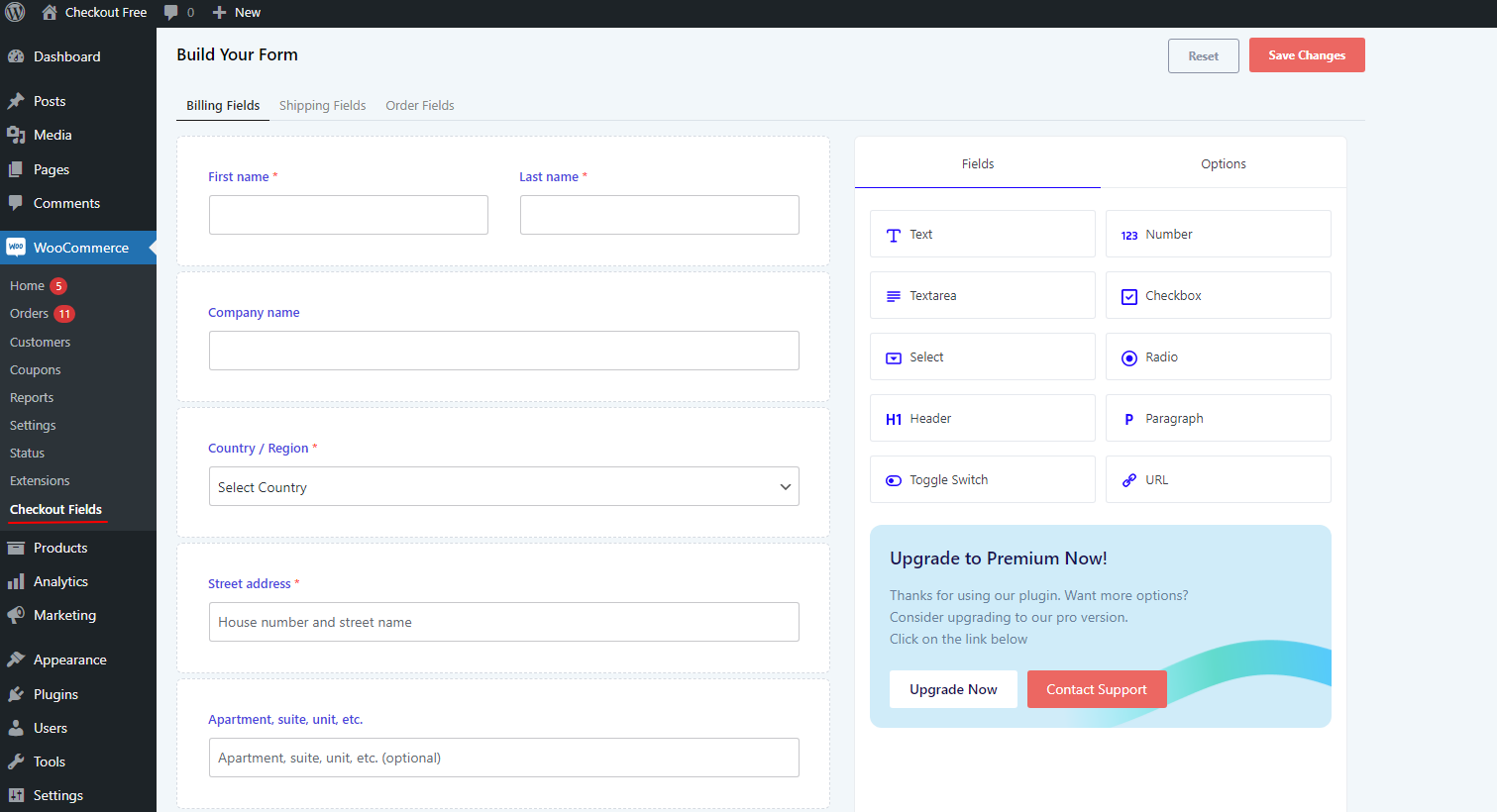
Checkout Form Builder 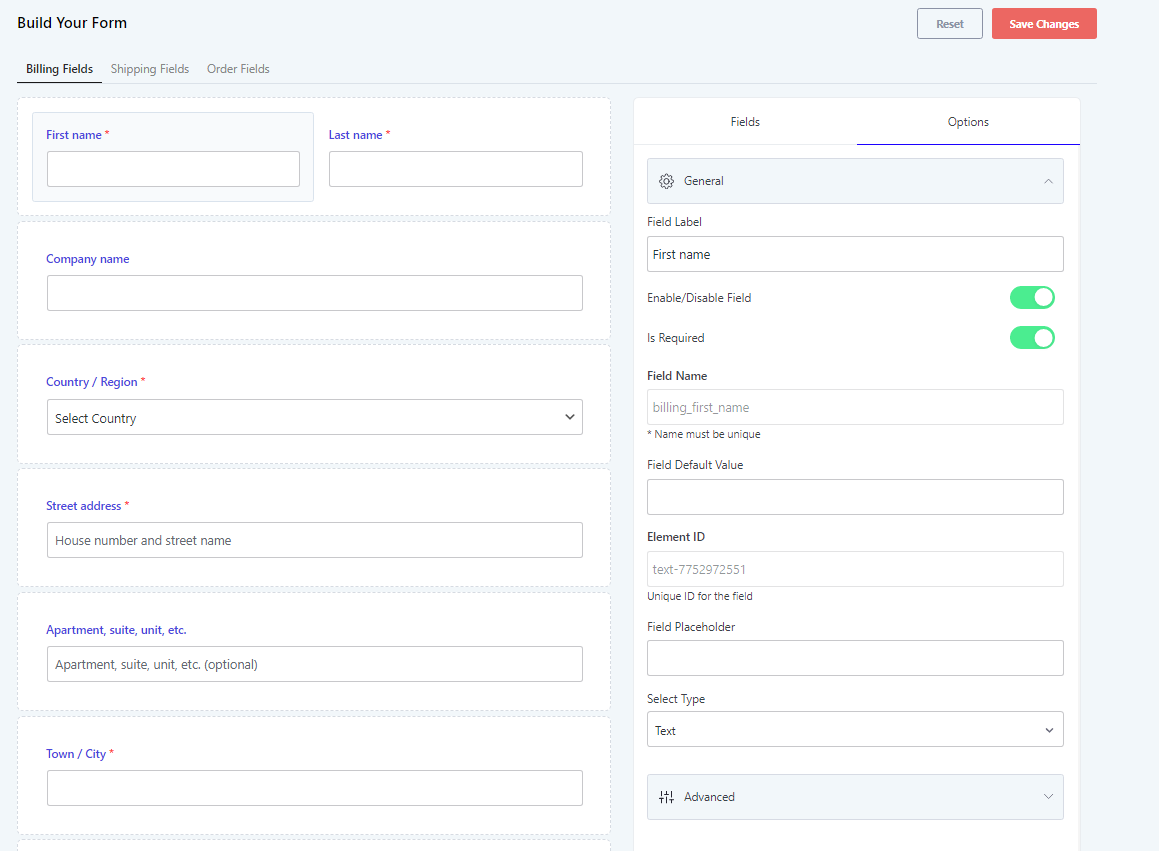
Field Editor View 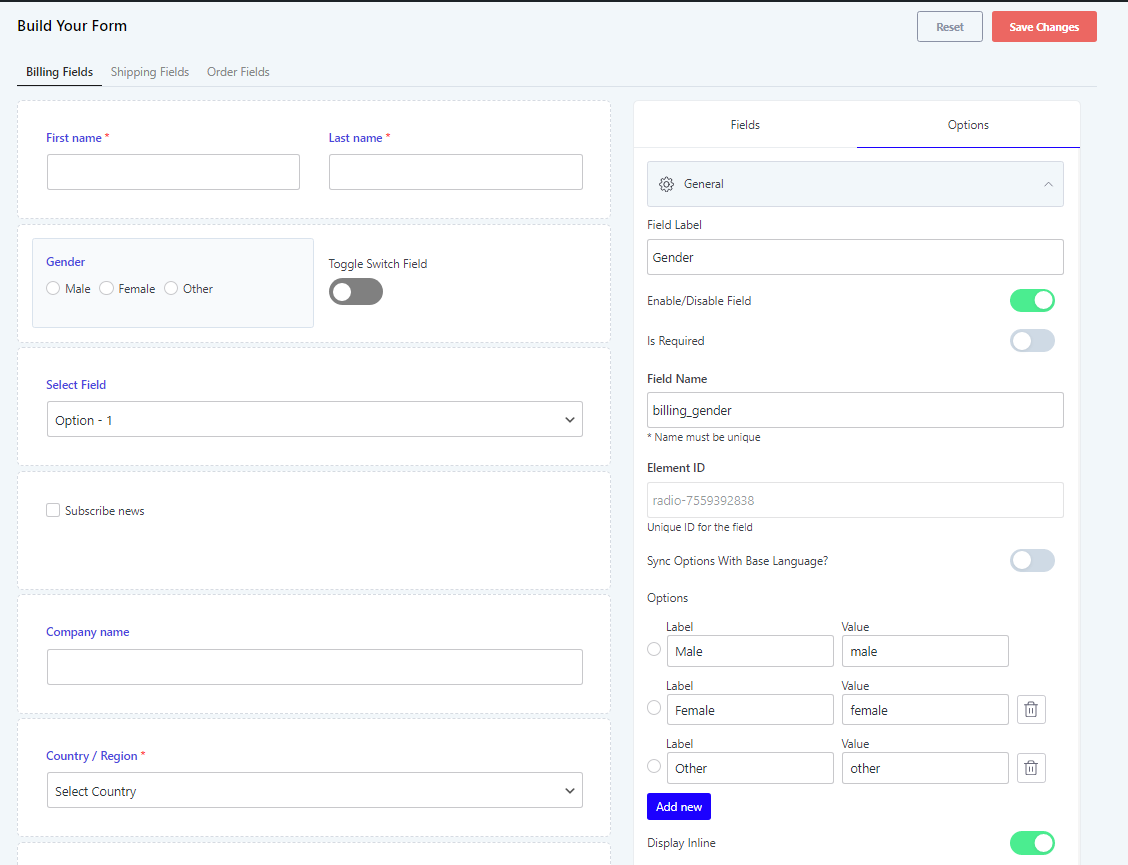
Field Editor View 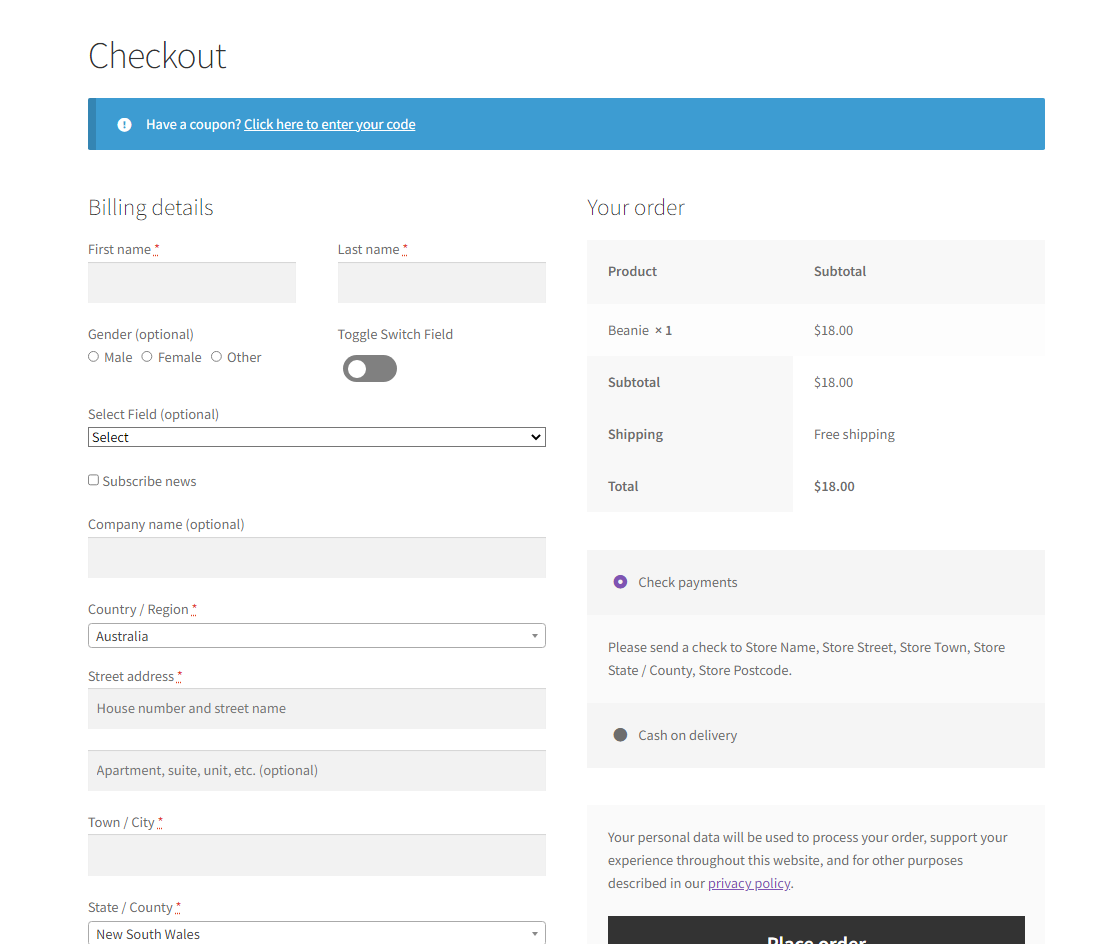
Checkout Fields Front End View
Installation
Installing “Checkout Field Editor and Manager for WooCommerce” can be done either by searching for “Checkout Field Editor and Manager for WooCommerce” via the “Plugins > Add New” screen in your WordPress dashboard, or by using the following steps:
- Download the plugin via WordPress.org
- Upload the ZIP file through the ‘Plugins > Add New > Upload’ screen in your WordPress dashboard
- Activate the plugin through the ‘Plugins’ menu in WordPress
FAQ
-
Can I remove default checkout page fields
-
No, you can only able to disable default fields.
-
Where can I add new fields, only at beginning and ending of default fields?
-
There is no such restrictions. You can add, reorder fields everywhere in each sections using our drag and drop editor, like at the beginning, ending and in middle of default fields.
-
Where can I find new fields in order details
-
Extra fields details can be found at the default order data box on the order detail page.
-
Is it possible to include extra fields to order emails
-
Yes, each field has an option given to check whether it should shown on the email or not.
-
Is it possible to duplicate default sections
-
Yes, you can duplicate a default section on a single click with pro version of our plugin.
-
Is it possible to display custom filed value as order table column
-
Yes it is possible with pro version of our plugin, but not with free version.
Reviews


Contributors & Developers
“Checkout Field Editor for WooCommerce – Checkout Manager” is open source software. The following people have contributed to this plugin.
Contributors


“Checkout Field Editor for WooCommerce – Checkout Manager” has been translated into 11 locales. Thank you to the translators for their contributions.
Translate “Checkout Field Editor for WooCommerce – Checkout Manager” into your language.
Interested in development?
Browse the code, check out the SVN repository, or subscribe to the development log by RSS.
Changelog
2.2.21
- Support for WordPress 6.5
2.2.20
- Support for WooCommerce 8.7
2.2.19
- Support for WooCommerce 8.5
2.2.18
- Support for WooCommerce 8.4
- Bug fix
2.2.17
- Support for WordPress 6.4
- Support for WooCommerce 8.3
2.2.16
- Support for WooCommerce 8.2
2.2.15
- Support for WooCommerce 8.0
- Support for WordPress 6.3
2.2.14
- Support for WooCommerce 7.9
- Added advanced settings
2.2.13
- Support for WooCommerce 7.7
2.2.12
- Support for WooCommerce 7.6
2.2.11
- Support for WordPress 6.2
2.2.10
- Support for WooCommerce 7.5
2.2.9
- Support for WooCommerce 7.4
2.2.8
- Support for WooCommerce 7.3
2.2.7
- Support for WooCommerce 7.2
2.2.6
- Bug fix – WooCommerce PayPal Payments plugin
2.2.5
- Support for WooCommerce 7.1
2.2.4
- Support for WordPress 6.1
2.2.3
- Translation fix
2.2.2
- Support for WooCommerce 7
- New field types – URL, toggle switch
2.2.1
- UI update
- New field types – Number, checkbox
2.2.0
- Support for WooCommerce 6.9
2.1.25
- Bug fix
2.1.25
- Support for WooCommerce 6.8
2.1.24
- Support for WooCommerce 6.7
2.1.23
- Support for WordPress 6
- Support for WooCommerce 6.5
2.1.22
- Support for WooCommerce 6.4
2.1.21
- Support for WordPress 5.9
2.1.20
- Support for WooCommerce 6.1
2.1.19
- Support for WooCommerce 6
2.1.18
- Support for WooCommerce 5.9
2.1.17
- Support for WooCommerce 5.7
- Bug fix
2.1.16
- Support for WooCommerce 5.6.x and WordPress 5.8.1
2.1.15
- Support for WooCommerce 5.5.x and WordPress 5.8.x
- Reset button
2.1.14
- WooCommerce 5.4 compatible
- Bug fix
2.1.13
- Added support for WooCommerce 5.2.2
2.1.12
- Added support for WooCommerce 5.1.0 and WordPress 5.7.0
2.1.11
- WooCommerce 5.0.0 compatible
2.1.10
- WooCommerce 4.9.0 compatible
2.1.9
- Added support for WooCommerce 4.8.0 and WordPress 5.6.0
2.1.8
- Bug fix
2.1.7
- Bug fix
2.1.6
- WooCommerce 4.7 compatible
2.1.5
- Bug fix
2.1.4
- WooCommerce 4.6 compatible
2.1.3
- WooCommerce 4.5.2 compatible
- Bug fix
2.1.2
- Added support for WooCommerce 4.5.0 and WordPress 5.5.1
2.1.1
- Bug fix
2.1.0
- WooCommerce 4.4.0 compatible
2.0.9
- Added support for WordPress 5.5
2.0.8
- WooCommerce 4.3.0 compatible
2.0.7
- WooCommerce 4.2.0 compatible
2.0.6
- WooCommerce 4.1.0 compatible
2.0.5
- Bug fix
2.0.4
- WooCommerce 4.0.0 compatible
2.0.3
- Bug fix
2.0.2
- Bug fix
2.0.1
- Bug fix
2.0.0
- UI enhancements
1.0.5
- Bug fix
1.0.4
- WooCommerce 3.8.0 compatible
1.0.3
- Bug fix
1.0.2
- Bug fix
1.0.1
- Bug fix
1.0.0
- WPML and Polylang support
- Bug fixes
0.1.1
- Corrected database field key
0.1.0
- Initial release (beta)