
Description
The Monthly Events Calendar for WordPress is a feature-rich plugin that enhances your WordPress website by providing a comprehensive and visually appealing way to manage, display, and promote events. This plugin is designed to help individuals, businesses, organizations, and communities efficiently organize and showcase events such as conferences, seminars, workshops, meetings, performances, webinars, social gatherings, and much more.
Check the documentation of Events Calendar’s
This plugin used the REST API to display the events.
🚀 Use the shortcode [wp_monthly_events] to display it on the page.
📅 Key features of an Monthly Events Calendar for WordPress typically include:
✨ Event Creation and Management
Easily create, edit, and manage events through an intuitive user interface. You can set event details such as title, date, time, location, description, categories, tags, and featured images.
✨ Interactive Calendar Display
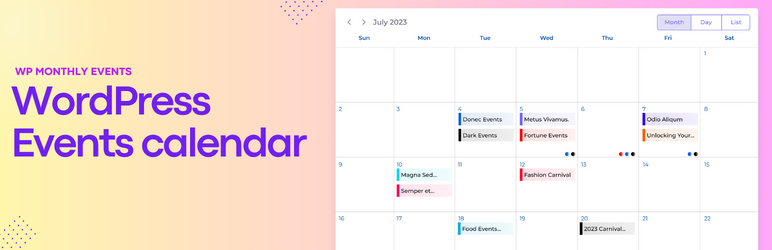
Display events in a user-friendly calendar format, allowing visitors to view events by month, day, or even in an agenda-style list. Users can navigate through dates and click on events to access more information.
✨ Customizable Event Views
Users can choose different views based on their preferences, like monthly grid view, day schedule view, or a list view. This customization provides a tailored experience for your audience.
✨ Venue Management
Maintain a database of venues or locations where events are held. Users can easily access address details.
✨ Event Categorization and Tags
Categorize events into different types (e.g., workshops, conferences, concerts) and provide tagging options so users can find events of interest more easily.
✨ Responsive Design
Ensuring that the calendar is mobile-friendly and adjusts its layout to different screen sizes for a consistent user experience across devices.
Overall, an Events Calendar for WordPress empowers website owners to effectively communicate their event schedules, engage their audience, and enhance the user experience by providing a centralized hub for event-related information. It simplifies the management of events and encourages user participation, making it an essential tool for any WordPress site aiming to promote and organize events.
Screenshots


Blocks
This plugin provides 1 block.
- Monthly Events Calendar Display the Monthly Events Calendar.
Installation
This section describes how to install the plugin and get it working.
e.g.
- Upload
ecwpfolder to the/wp-content/plugins/directory. - Activate the plugin named “Monthly Events Calendar” through the ‘Plugins’ menu in WordPress.
- Navigate to WordPress Admin end “Pages => Add New” in the admin end.
- Add the shortcode [wp_monthly_events] to display the events calendar.
- Hurrah! You have configured the plugin successfully.
FAQ
-
How do I find events on the calendar?
-
You can browse events by using the calendar’s navigation buttons or selecting different views (Month, Day, List). You can also use the search options to find specific types of events.
-
Does it work without REST API?
-
No. You need to enable the REST API if some of the security plugins denied that.
Reviews


Contributors & Developers
“Monthly Events Calendar” is open source software. The following people have contributed to this plugin.
Contributors
Translate “Monthly Events Calendar” into your language.
Interested in development?
Browse the code, check out the SVN repository, or subscribe to the development log by RSS.
Changelog
1.6
- New: Use your existing The Events Calendar events right away. They show in Monthly Events Calendar read-only, with nothing to import and nothing changed in The Events Calendar. To go back, deactivate Monthly Events Calendar.
- New: Events Switch from TEC imports categories, venues, organizers and events (keeping slugs, featured images and Rank Math / Yoast SEO settings). Safe to run again. Old /event/ addresses redirect to the imported events, and /venue/ and /organizer/ addresses redirect to your calendar.
- New: Each event has its own timezone and an all-day option.
- New: The event archive (/events/) shows the calendar.
- New: Pages using the [tribe_events] shortcode show Monthly Events Calendar while The Events Calendar is deactivated.
- Fix: Events that span a whole month (starting before it and ending after it) now show in that month.
- Fix: Quick Edit and other saves outside the edit screen no longer erase an event’s dates, website and colour.
- Dev: Dates are stored as local time + timezone, with one row per occurrence in a new table, ready for recurring events. Events from 1.5 are converted automatically. The old ecwp_event_date_start / ecwp_event_date_end keys are still kept up to date and still work if other tools write them.
- Dev: New REST endpoint /ecwp/v1/events for the calendar.
1.5
- New: Compatible with Loco Translate Plugin.
- Fix: Text domain now matches the plugin slug, so translations and language packs load correctly.
- Compatibility: Tested up to WordPress 7.0; PHP requirement set to 7.4.
1.4
- New: Gutenberg block for inserting the events calendar (shortcode still supported).
- Fix: Text domain now matches the plugin slug, so translations and language packs load correctly.
- Compatibility: Tested up to WordPress 7.0; PHP requirement set to 7.4.
1.3
- Fix: Month and Upcoming views now resolve event dates reliably across timezones; past events no longer appear under Upcoming, and events now show in the correct month.
- Fix: Calendar navigation now advances to the correct year when moving from December to January (and back).
- Security: Restricted the settings REST endpoint to administrators and added input sanitization on save.
- Compatibility: Tested up to WordPress 6.8.
1.0.0
- Initial Release of the Plugin