
Description
Sell Downloads features:
» Sell Downloads is a WordPress eCommerce
» Allows selling digital files like audio,video,documents,pictures,etc.
» Allows to filter products by types of files
» Includes multiple layouts for the store
» Allows paging and sorting the results by popularity, price or file name
» Uses PayPal as payment gateway. Payments are SCA ready (Strong Customer Authentication), compatible with the new Payment services (PSD 2) – Directive (EU)
» Allows sharing products in social networks (Facebook, Twitter, Google+)
» Allows to associate additional information to the products
» Allows to protect the files with the inclusion of a file’s demo
» The demo files will be displayed directly on browser, whether are enabled
the corresponding plugins in browser
Sell Downloads is an WordPress eCommerce for selling downloadable files: audio, video, documents, pictures all that may be published in Internet. Sell Downloads uses PayPal as payment gateway, making the sale process easy and secure.
Create an e-commerce for sell digital files never was more easy than with “Sell Downloads”, the majority of e-commerce plugins are developed thinking in tangible products and does the sale’s process very complex. An ecommerce that pretends to sale only digital files must to coexist with data related to tangible products, configure shipping cost, etc, “Sell Downloads” doesn’t need any of previous data. With “Sell Downloads” is required only define the PayPal data and the products to sell.
More about the Main Features:
- Allows selling your digital files via PayPal. PayPal is the payment gateway by excellence, very easy to use and very secure.
- Allows a custom setup of the ecommerce, with ability to filter products by types of files, paging and sorting the results by popularity, price or file name, making of “Sell Downloads” a very configurable plugin.
- Allows to insert a specific product in a post or page.
- Allows to associate additional information to the products. For example, if are selling a book and like to associate a link to other books of the same editorial, or a page of reviews from critics, this field would be the option for do it.
- Allows to protect the files with the inclusion of a file’s demo. Monographies, videos, songs and many other digital files, allow the creation of a version for demo. It is very hard to sell a song if the possible customers never hear at least a part of it, similar happen with videos and its trailers or the monographies and its abstracts.
- Includes a module to track sales statistics. With the statistics module is possible to know the amount of sales, the discounts applied or coupon used, and check the total of earnings by the ecommerce in a period of time. The statistics module allows to display animated charts with specific reports like: sales by currency, country or products.
The “Sell Downloads” plugin allows the specific integration with the following editors:
- Classic WordPress Editor.
- Gutenberg Editor.
- Elementor.
- Page Builder by SiteOrigin.
- BeaverBuilder Editor.
- For other editors, the shortcodes should be inserted using other controls of general purpose, like the controls for inserting HTML or shortcodes.
The base plugin, available for free from the WordPress Plugin Directory has all the features you need to create a ecommerce for sell downloads on your website.
Inserting and using the basic “Sell Downloads” plugin.
Premium Features:
- Allows to enable a shopping cart. With a shopping cart is possible to sell multiple products in the same purchase action, the customers will appreciate this feature.
- The product is available as widget to be inserted in the website’s sidebars.
- Allows to insert a product list in a post or page. The products can be selected between the most rated, the newest, or top selling. The product list is available as widget to be inserted in the website’s sidebars.
- Allows to define sales discounts. It is usual in the e-commerce create sales campaigns, define discounts for products or events (like mothers day, the Christmas,etc.), to promote the sales. The “Sell Downloads” allows to define shop’s discounts, and display the previous and new prices of products.
- Allows to define discount coupons. The coupons are an excellent tool to know where is the origin of sales and create (like in discounts definition) sales campaings, but directed to a specific sector or website. The coupons are applied to all sales from the ecommerce.
Inserting and using the premium “Sell Downloads” plugin.
Demo of Premium Version of Plugin
https://demos.dwbooster.com/sell-downloads/wp-login.php
https://demos.dwbooster.com/sell-downloads/
Are safe the downloads links?
The security in the access to products files is determined in different ways.
- The products files can’t be accessed directly. The purchased files are stored in a special directory called sd-downloads, the sd-downloads directory includes a .htaccess file that forbid the access from browser. The files can be accessed only through a server side script that validates the purchase.
- The Store determines the validity of download links based in three options, available in the settings page of plugin.
It is possible define a time period, in days, where a download link is considered valid. If a user tries to download a purchased product, the Store checks the date of purchasing.
The Store may be configured to request the email address used in the purchasing to check the validity of download link.
It is possible define a limit of downloads by purchase. If a user tries to download a product, the Sell Downloads checks how many downloads have been made.
If you want more information about this plugin don’t hesitate in checking the plugin’s website:
http://wordpress.dwbooster.com/content-tools/sell-downloads
Inserting a products list, and products, in pages or sidebars of website (only available in the premium version of plugin).
Interface
Setting up of shop
Sell Downloads can be set up via the menu: “Sell Downloads > Sell Downloads Settings”. The setup screen offers general settings for the shop, allows entering the PayPal data required to process sales and texts that will be used for the email notifications with the download links of the purchased files.
Settings Interface
The setup interface of commerce includes the following fields:
- URL of store page: Enter the URL of the webpage where the ecommerce was inserted. The URL of the store will be used to return from the product page to the shop page.
- Allow searching by taxonomies: Modifies the search process of WordPress to allow the products be found by their taxonomies.
- Allow to filter by type: Inserts a field into the shopping webpage that allows to filter products by type (jpg, mp3, doc,….)
- Store layout: Allows select one of the multiple layouts available for the store.
- Allow multiple pages: Allows paging through the shop’s products.
- Items per page: Defines the number of products per page in the commerce’s page.
- Share in social networks: Display a group of buttons for sharing the products in the social networks(like Facebook, Twitter and Google+)
- Facebook app id for sharing in Facebook: App id for sharing the website’s links in Facebook.
Payment gateway data (PayPal)
- Enable PayPal Payments: Allows the sale of products through PayPal.
- PayPal email: Enter the email address associated with the PayPal account.
- Currency: Symbol of the currency in which payments are accepted.
- PayPal language: Preferred language of the PayPal interface.
- PayPal button: Select the PayPal button design.
- Increase the download page security: Requests the email used in product’s purchase from the download page.
- Download link valid for: Set an expire time for the download links.
Discount settings applied to the sales of the ecommerce. In the shopping cart the discount is applied to the total sale cost(premium version)
- Percent to discount: Enter the percent to discount to the total sale cost.
- Valid for sales over than: Apply discount to sales superior to this value.
- Valid from (dd/mm/yyyy): Apply discount from the entered date.
- Valid to (dd/mm/yyyy): Apply discount until the entered date.
- Promotional text: Text to promote the discount.
Coupon settings applied to all sales of the ecommerce(premium version)
- Percent to discount: Enter the percent to discount to the total sale cost.
- Coupon: Enter the coupon code.
- Valid from (dd/mm/yyyy): The coupon is valid from the entered date.
- Valid to (dd/mm/yyyy): The coupon is valid to the entered date.
Notification Settings, both for buyers to complete a payment, and the shop manager
- Notification “from” email: E-mail address that will appear as the sender of notifications.
- Send notification to email: Email address where a notification is sent after each sale.
- Subject of user confirmation email: Subject of the confirmation email sent to the customer when making the purchase.
- Email confirmation to user: Body of message sent to the customer when making the purchase. The message should include the tag %INFORMATION% which will be replaced by the purchase data, like the download link.
- Subject of email notification to admin: Subject of email notification sent to the administrator when a purchase is made.
- Email notification to admin: Body of the email message sent to the administrator when a purchase is made. The message text should include the tag %INFORMATION%, which will be replaced by the purchase data.
Affiliate Royale Integration, if the Affiliate Royale plugin is installed on the website, and you want integrate it with the store.
Creating product for commerce
The shop allows to sell possible digital files (video, audio, documents, etc). To create a product press the menu option “Sell Downloads > Products for Sale”. Initially it displays the list of products entered previously and a set of data associated with the product: Product Name, File Type, Downloads, Purchases and Date (screenshot-2)
To enter a new product/file to the shop press “Add New”.
The interface for entering data pertaining to a product is described below (screenshot-3):
Product’s data
- Enter Title Here: Enter the title-name of the product to display in the shop page and the product page.
- Description: Description of the product. This field is optional, but offers the opportunity to provide additional information about the product, this information is displayed only in the product page.
- Sales Price: Retail price of the product.
- File for sale: URL of the file to sell. The button associated with the field displays the WordPress media gallery making it easy to select the file.
- File for demo: URL file demo. The file for demo may be accessed from the ecommerce page.The button associated with the field displays the WordPress media gallery making it easy to select the file.
- File Type: Select a file type from the list or enter a new one if it is not yet on the list. The file type allow filtering the products in the shop page.
- Image: URL of an image that represents the product, the product image is shown in the ecommerce page and product page. The button associated with the field displays the WordPress media gallery making it easy to select the file.
- Duration: Enter a value with time format. Useful for Audio and Video files. With other files types the fields may be let empty.
- Publication Year: Enter a value with year format. Useful for files associated with a date, as the creation or publication date , for example a book or monograph.
- Additional Information: URL of a webpage with additional information about the product.
Programming a discount for the specific product(premium version)
- New price: The new price to apply to the product. The old and new prices will shown in pages of the ecommerce and the specific product.
- Valid from (dd/mm/yyyy): Apply discount from the entered date.
- Valid to (dd/mm/yyyy): Apply discount until the entered date.
- Promotional text: Text to promote the discount. The promoting text will be shown in the shop page.
Publishing the “Sell Downloads” ecommerce
The “Sell Downloads” ecommerce can be posted on a page or post of WordPress. To insert the “Sell Downloads” shop go to the relevant section (page or post) and press the “Sell Downloads” button above the content editor of post/page(screenshot-4), the action displays a setup screen (screenshot-5)
Interface for insertion dialog
- Filter results by products type: by default, displays only products that belong to a specified type.
- Columns: Defines the number of columns in the shop page.
The insertion process generates a shortcode which will be replaced by the shop when it is displayed on the website.
Note: After inserting the ecommerce on a page of your WordPress, it is advisable to copy the URL of the relevant page, and enter in the “Sell Downloads” setup section, to allow the users to return to the shop from the product page.
Shortcode attributes
Through the shortcode it is possible define some attribute for change the store’s settings:
columns: Enter the number of columns to display the products in the store with a grid format. By default the value of “columns” attribute is 1.
[sell_downloads columns="3"]
filter_by_type: The values allowed are 1 or 0, and shows or hide the filtering by product’s type in the header section of the store’s page.
[sell_downloads columns="3" filter_by_type="1"]
show_order_by: The values allowed are 1 or 0, and shows or hide the “Order by” options in the header section of the store’s page.
[sell_downloads columns="3" show_order_by="1"]
order_by: The values allowed are: plays, price, post_title, post_date. Allows ordering the products in the store’s page by the criteria defined in the attribute.
[sell_downloads columns="3" order_by="post_title"]
Interface for insertion dialog of product (the products list is available as widget to be inserted in the website’s sidebars)(the option is available only in the premium version of “Sell Downloads” plugin)
- Enter the product’s ID (screenshot-6)
The insertion process generates a shortcode which will be replaced by the product when it is displayed on the website.
Interface for insertion dialog of product list (the products list is available as widget to be inserted in the website’s sidebars)(the option is available only in the premium version of “Sell Downloads” plugin)
- Select the type of list: it is possible insert the list of top rated products, the newest or top selling.
- Number of products to show: enter the number of products to display in the list.
- Number of columns: enter the number of columns.
(screenshot-7)
The insertion process generates a shortcode which will be replaced by the list of products when it is displayed on the website.
The products list, and specific products, can be inserted as widgets on sidebars (screenshot-8)
Sales Statistics
When a sale takes place, a notification email is sent to the shop manager. However, sales can also be reviewed in Sales Reports. To do this, go to option “Sell Downloads > Sales Reports”(screenshot-9)
The Reports section allows you to filter sales reports over a specific …
Screenshots

Sell Downloads Item 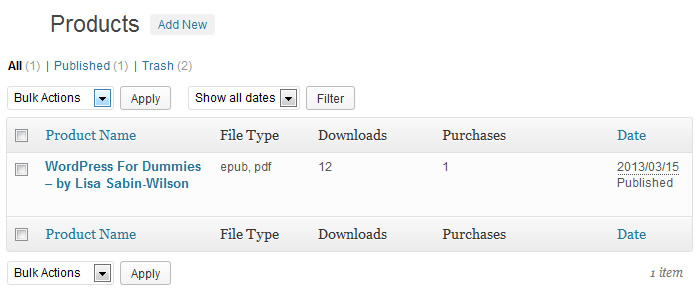
Sell Downloads Product Section 
Product Edition Interface 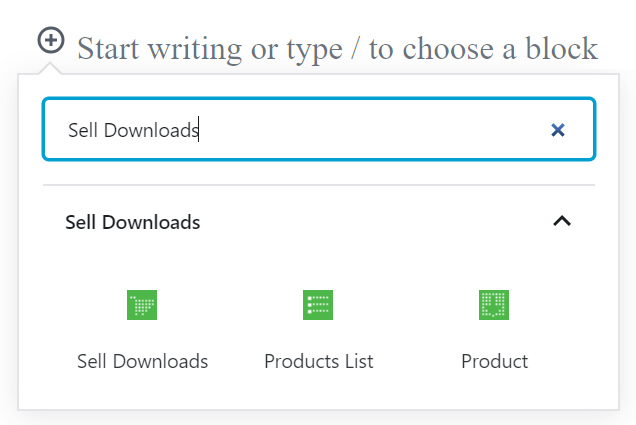
Integration with the Gutenberg Editor 
Integration with the Elementor Editor 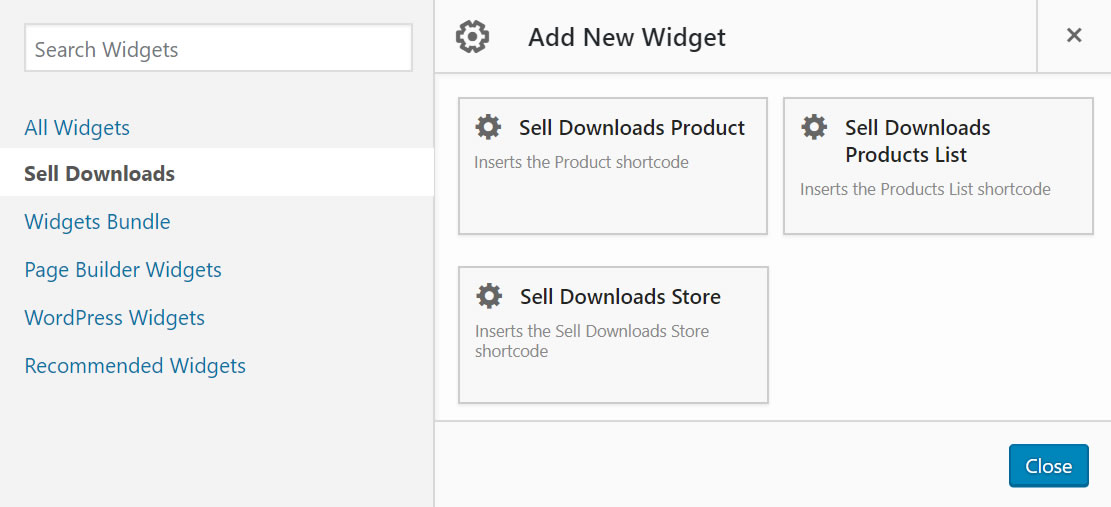
Integration with the Page Builder by SiteOrigin 
Sell Downloads Insertion Button 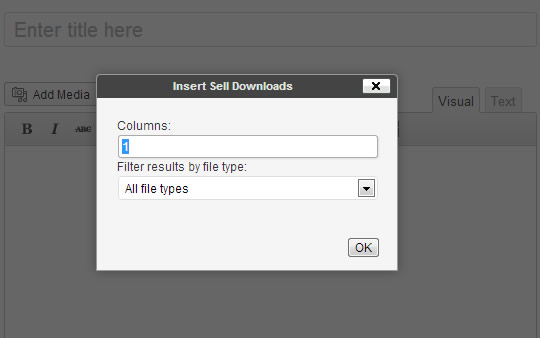
Sell Downloads Insertion Interface 
Integration with the BeaverBuilder Editor. 
Insertion Interface for Product 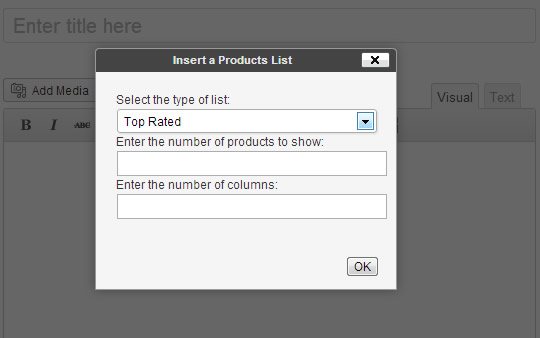
Insertion Interface for Products List 
Available Widgets for Products and Products List Insertion 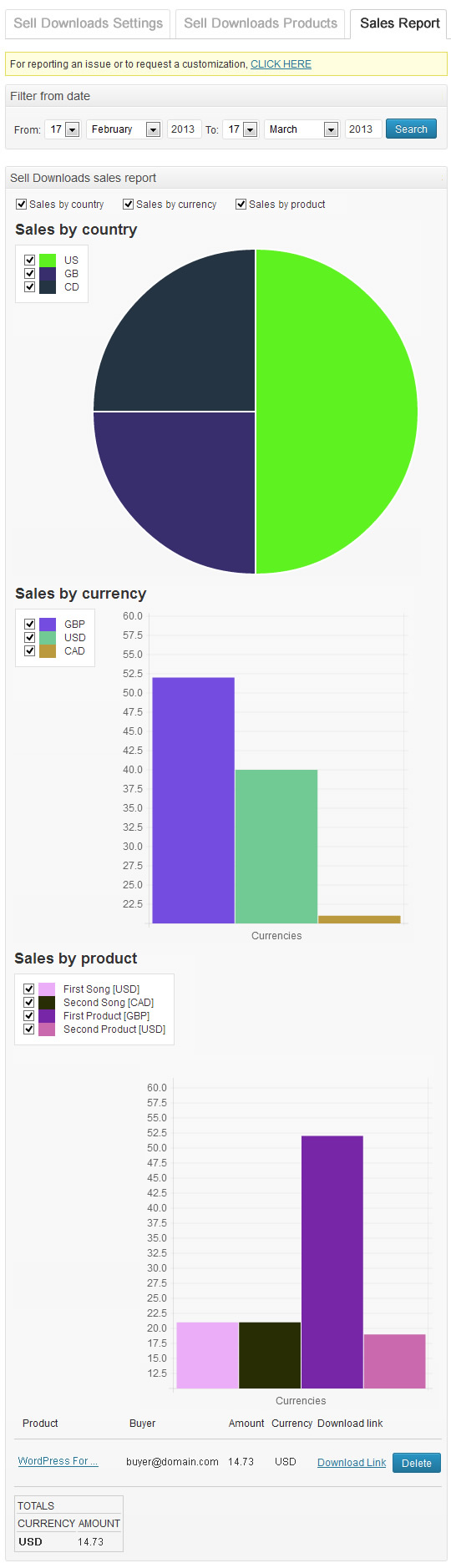
Sales Reports 
Filtering Sales Report 
Available layouts
Blocks
This plugin provides 2 blocks.
- Sell Downloads
- Product
Installation
To install Sell Downloads, follow these steps:
- Download and unzip the plugin
- Upload the entire “sell-downloads” directory to the “/wp-content/plugins /” directory
- Activate the plugin through the ‘Plugins’ menu in “WordPress”
- Go to “Sell Downloads > Sell Downloads Settings” and set up your store.
FAQ
-
A: First, go to the settings page of commerce and be sure the PayPal checkbox is checked, and has defined the seller’s email. Second, be sure the product has a price defined and a file for sell associated.
-
Q: How the discounts are treated by the store?
-
A: If the store has defined a discount and a coupon at the same time, only one is applied to the sale, the biggest of both.
-
Q: How to download all purchased products as only one file?
-
A: To download all purchased files as only one file, is required enabling the zip option from the settings page of “Sell Downloads”. The zip feature may be disabled in your website because the required extensions are not present in the PHP of the web server.
-
Q: Why the sell downloads is not loading on page?
-
A: Verify that the theme used in your website, includes the function wp_footer(); in the template file “footer.php” or the template file “index.php”
-
A: Go to the plugins section in WordPress, deactivate the free version of Sell Downloads, and delete it ( Don’t worry, this process don’t modify the products created with the free version of plugin), and finally install and activate the premium version of plugin.
-
Q: Does allow the sell downloads a different payment gateway than PayPal?
-
A: I’m sorry, but the current version of plugin allows PayPal only.
-
Q: Can the customers pay directly with its credit cards?
-
A: The restriction is imposed by PayPal. Please, check that your PayPal account allow to charge directly from the credit cards of customers.
-
Q: Is possible modify the appearance of sell downloads products?
-
A: The design of each section of Sell Downloads, is determined from templates located in “/wp-content/plugins/sell-downloads/sd-templates”.
The “sd-templates” directory contains multiple files.
The template files:
- product.tpl.html is used in the store page.
- product_single.tpl.html is used in particular pages of products.
- product_multiple.tpl.html is used in pages of multiple entries like: archives and search result page.
-
Q: Is possible promote a product, or products list?
-
A: It is possible promote a product or products list, from the website’s sidebars, or directly from the content of pages or posts.
To promote the products on sidebars, go to the widgets section, and inserts the corresponding widget on sidebar.
To promote the products from the content of pages and posts, go to the page and press the corresponding icon over the contents editor.
-
Q: Are safe the products’ downloads?
-
A: The security in the access to products files is determined in different ways.
- The products files can’t be accessed directly. The purchased files are stored in a special directory called sd-downloads, the sd-downloads directory includes a .htaccess file that forbid the access from browser. The files can be accessed only through a server side script that validates the purchase.
- The Store determines the validity of download links based in three options, available in the settings page of plugin.
— It is possible define a time period, in days, where a download link is considered valid. If a user tries to download a purchased product, the Store checks the date of purchasing.
— It is possible define a limit of downloads by purchase. If a user tries to download a product, the Sell Downloads checks how many downloads have been made.
— The Store may be configured to request the email address used in the purchasing to check the validity of download link.
-
Q: Can I customize the store’s design?
-
A: The plugin includes some different designs that can be selected through the settings option “Store Layout”, but you can create a new once, duplicating an of available store’s layouts, and edit its style.css file
-
Q: How to configure the IPN on PayPal Sandbox ?
-
A: https://www.paypal.com/cgi-bin/webscr?cmd=p/sell/ipn-test-outside
-
Q: Is possible to search the products by their types, from the search box of my website?
-
A: Yes, that’s possible. The products types are taxonomies, and for searching by the products’ taxonomies, go to the settings page of the store, and tick the checkbox: “Allow searching by taxonomies”, and that’s all.
Reviews


Contributors & Developers
“Sell Downloads” is open source software. The following people have contributed to this plugin.
Contributors
Translate “Sell Downloads” into your language.
Interested in development?
Browse the code, check out the SVN repository, or subscribe to the development log by RSS.
Changelog
1.1.3
- Modifies the integration with the payment gateways.
1.1.2
- Modifies the module that identifies local files.
1.1.1
- Modifies the links to IPN documentation.
1.1.0
- Fixes deprecated notices in the latest version of PHP.
1.0.150
- Modifies the banner module.
1.0.149
- Clear session variables when editing the Music Store page.
1.0.148
- Modifies the integration with Elementor to ensure compatibility with the latest version of Elementor.
1.0.147
- Modifies the register post type to hide the description from the archive page.
1.0.146
- Improves the plugin security.
1.0.145
- Fixes a minor issue in the integration with the payment gateways.
1.0.144
- Fixes a warning.
1.0.143
- Fixes an issue with the products list in the admin section.
1.0.142
- Implements new validation rules to improves the plugin security.
1.0.141
- Modifies functions deprecated by the latest Elementor update.
1.0.140
- Minor changes in the product’s appearance.
- Modifies the shopping cart page in the commercial version of the plugin.
1.0.139
- Modifies the Elementor widget.
1.0.138
- Fixes a minor issue in the PDF viewer for products demos.
1.0.137
- Fixes the issue of the invalid characters into the products’ names in the integration with PayPal.
1.0.136
- Modifies the Elementor widget.
1.0.135
- Includes new options in the permalinks settings to modify the slugs for products and taxonomies.
1.0.134
- Allows entering a default cover to use with products without an image associated.
1.0.133
- Uses the featured images of products if they don’t have associated covers.
1.0.132
- Modifies the management of transients.
1.0.131
- Allows to insert products.
- Improves the Gutenberg integration.
1.0.130
- Improves the store’s appearance on mobile devices.
1.0.129
- Modify manually registered sales to allow sending the email to the buyer with the download link.
1.0.128
- Includes the Troubleshoot section in the store’s settings to fix a conflict with some servers settings.
1.0.127
- Fixes a conflict with Elementor.
1.0.126
- Modifies the payment processing to improves the users’ feedbacks against the delays in PayPal notifications.
1.0.125
- Includes a new feature in the store’s settings to limit the access to the free products to registered users only.
1.0.124
- Includes a new section in the products’ settings to emulate manual purchases.
1.0.123
- Fixes an issue in the Layout 1.
1.0.122
- Modifies the styles to avoid visual conflicts with currencies that must be shown in uppercase, such as CHF.
1.0.121
- Allows to associate multiple images with the products and display images pop-up in the products’ pages.
1.0.120
- Improves the store’s accessibility.
1.0.119
- Fixes an issue in the sales reports module for entering manual purchases.
1.0.118
- Modifies the scripts blocks to prevent the uncaught errors in other plugins affect to the Store.
1.0.117
- Modifies the code that generates the download and cart pages.
1.0.116
- Checks a possible issue with the database structure, and fixes it.
1.0.115
- Includes a new section in the sales reports to allow entering manual purchases.
1.0.114
1.0.113
- Modifies the management of the session’s variables.
1.0.112
- Includes a new attribute in the products settings for selling them individually, are associated to them a quantity field.
1.0.111
- Replaces the buy buttons images with texts and css, allowing translate their texts and modify their designs.
1.0.110
- Fixes an issue in the database.
1.0.109
- Modifies the layout 3.
- Fixes some conflicts with the themes’ styles.
- Highlights the most important attributes in the products and store’s settings.
- Increases the timeout for accessing to the files hosted on external domains.
1.0.108
- Includes a new attribute in the store’s settings for controlling the additional attribute to prevent the pages cache.
1.0.107
- Fixes an issue with the notification emails.
1.0.106
- Allows to associate custom fields to the products.
1.0.105
- Adapts the plugin’s blocks to the new version of the Gutenberg editor.
1.0.104
- Includes a new section to customize the products templates.
1.0.103
- Includes a new option in the sales reports to resend the download link to the buyer and reset the number of downloads.
1.0.102
- Includes a list of filters to allow modify the products data before display them:
sell-downloads-title
sell-downloads-votes
sell-downloads-cover-url
sell-downloads-time
sell-downloads-year
sell-downloads-info
sell-downloads-content
1.0.101
- Modifies the styles of players.
1.0.100
- Includes a new module to prevent the WP Super Cache plugin cached the download page, and other particular pages of the store.
1.0.99
- Modifies the module for debugging the payments.
1.0.98
- Includes new Order By options.
1.0.97
- Modifies the access to the demos.
1.0.96
- Includes new options in the store’s settings to decide the images’ size of products’ covers.
1.0.95
- Includes a new section in the store’s settings to make easier the debugging of payments notifications.
1.0.94
- Fixes a notice in the products’ settings.
- Includes new attributes in the online demos to prevent the size of videos break the page’s structure.
1.0.93
- Fixes a warning saving the products changes.
1.0.92
- Includes two new constant that can be included in the notification emails: %DATETIME% that would be replaced by the purchase date/time, and “%BUYERNAME%” that would be replaced by the first name and last name of the buyer, if there is an user in the website with payer’s email.
1.0.91
- Fixes a conflict with third party plugins.
1.0.90
- Includes the integration with the BeaverBuilder Editor.
1.0.89
- Removes unnecessary code for the recent versions of WordPress.
- Corrects the roles of users that can create products (similar to other ecommerce plugins). Hiding the options from the WordPress menu for those users without access to them.
1.0.88
- Assigns the title attribute to the buttons for screen readers compatibility.
- The super admin can dissable the attribute that allows associate zip files to the songs, defining the SD_INCLUDE_ZIP_ATTRIBUTE constant as false into the wp-config.php file.
1.0.87
- Includes an attribute in the store’s settings, accessible only by the website’s administrators, for enabling or not, the option for accepting zipped files in the products, as the files for selling.
1.0.86
- Improves the plugin’s security.
1.0.85
- Fixes some minor errors.
1.0.84
- Modifies the module of the IPN script.
1.0.83
- Allows to define taxes from the store’s settings.
1.0.82
- Fixes some issues.
1.0.81
- Improves the identification of the special pages, like the download page, and the shopping cart page in the commercial version of the plugin.
1.0.80
- Improves the module that protects the store.
- Fixes some notices in the download process of purchased files.
1.0.79
- Modifies the module to download the purchased files.
- Modifies the module that the determines the default From and Destination addresses for the notification emails.
1.0.78
- Fixes some minor errors.
1.0.77
- Implements new widgets for integrating the plugin with Page Builder by SiteOrigin.
1.0.76
- Implements a real review module. Now the popularity is decided by the users, clicking on the corresponding star icon associated to the products, instead determine them automatically.
1.0.75
- Modifies the blocks for the Gutenberg editor, preparing the plugin for WordPress 5.1
1.0.74
- Accepts the new “exclude” attribute in the [sell_downloads] shortcode to exclude specific products from the store. The values of the attribute are the products’ ids separated by comma sign.
- Allows to define the new attribute from the different editors (The classic WordPress editor, Gutenberg editor and Elementor).
1.0.73
- Modifies the language files and plugin headers.
1.0.72
- Includes new widgets to allow the specific integration with the Elementor editor.
1.0.71
- Includes a new attribute in the store’s settings for controlling the popularity of products.
1.0.70
- Modifies the way the shortcodes are replaced to create the preview of the store and products in the Gutenberg editor.
1.0.69
- Improves the integration with the Gutenberg Editor.
- Modifies the module to download the purchased products to fix some issues in servers with low resources.
1.0.68
- Modifies the styles to solve some conflicts with different themes.
1.0.67
- Fixes an issue between the Promote Banner and the official distribution of WP5.0
1.0.66
- Modifies the store’s settings to allow detect easier the possible problems, and includes a video to teach users how configure their PayPal accounts.
1.0.65
- Fixes a conflict with the “Speed Booster Pack” plugin.
1.0.64
- Fixes an issue that displays a block of code in the download page.
1.0.63
- Allows to upload compressed files as the files for selling.
- Allows to include a special text in the download page: {download-links-here} to be replaced by the download links. The special text gives the websites owners more control over the format of the download pages. If the special text is not inserted the download links are concatenated to the download page’s content.
- Fixes an issue checking the memory available in the PHP script.
1.0.62
- Removes the attribute CrossOrigin from the audio and video tags.
- Fixes an issue in the return urls.
1.0.61
- Hides the promotion banner for the majority of roles and fixes a conflict between the promotion banner and the Gutenberg editor.
1.0.60
- Reduces the access to database.
1.0.59
- Fixes an issue with indices in the database tables.
- Improves the database queries.
1.0.58
- Modifies the wizard for the initial configuration.
1.0.57
- Improves the store configuration process.
1.0.56
- Improves the store configuration.
- Modifies the deactivation process to allow the users find easier the solution to the usual issues.
1.0.55
- Fixes some notices in the installation process.
1.0.54
- Removes and optimize some queries to increase the plugin’s performance.
1.0.53
- Modifies the way the client’s side scripts are executed to prevent the uncaught javascript errors on page affect the Store.
1.0.52
- Removes the invalid characters from the products names before contacting the payment gateway.
1.0.51
- Allows to define the download links valid for times intervals less than 1.
- Fixes an issue with the loopback requests when are being edited the code of plugins or themes in the WordPress editor.
1.0.50
- Includes the crossOrigin attribute in the audio and video tags for playing files in external domains.
1.0.49
- Allows the access to reports and store’s settings only to the websites administrators.
1.0.48
- Removes the copy of “MediaElement” player distributed with the plugin to use the version distributed with WordPress.
1.0.47
- Modifies the code that is considered deprecated by PHP7.
1.0.46
- Allows the integration with the Gutenberg editor (the next editor distributed with WordPress).
1.0.45
- Includes a new filter for the “get_the_excerpt” hook.
1.0.44
- Sends the Content-Type header when the Demo file is downloaded to prevent conflicts with some web servers that identify the demo files as texts, even when they are binaries.
1.0.43
- Applies the same charset used by the database to the plugin’s tables.
1.0.42
- Modifies the store’s styles, specifically its appearance in small screens, like mobiles devices.
- Includes a new predefined layout.
1.0.41
- Allows publishing comments in the store’s products.
- Allows to integrate the store with “Affiliate Royale”.
1.0.40
- Modifies the module for accessing the WordPress reviews section.
1.0.39
- Minifies the template files.
- Includes languages files for Italian (thanks to @passegua)
1.0.38
- Uses the internationalization functions into the template files, to allow translating these texts too.
1.0.37
- Modifies the module to determine if the file for selling is local to the website.
- Includes the languages directory and the default language files for English.
- Improves the access to the plugin documentation.
1.0.36
- Modifies the module that sanitizes the products attributes before send them to the browser.
1.0.35
- Modifies the IPN script to satisfy the new PayPal requirements.
1.0.34
- Fixes an issue in the regular expression that checks the uploaded files.
1.0.33
- Strips all dangerous tags from the products’ attributes.
1.0.32
- Strip tags from the terms in the File Types taxonomy.
- Excludes the invalid files types from the lists of files to associate with the products.
1.0.31
- Fixes a warning message accessing to QUERY_STRING in the store’s pages, in stores with multiple pages.
1.0.30
- Fixes an issue with servers where were enabled the Magic Quotes.
1.0.29
- Allows to enter the Facebook App id for sharing the website’s links in Facebook.
1.0.28
- Modifies the code in the IPN that checks the price of purchased products.
1.0.27
- Fixes an issue in PHP copying huge files.
1.0.26
- Includes try/catch blocks to prevent PHP fatal errors caused by PHPMailer.
- Fixes an issue caused by the files with apostrophes in their names.
1.0.25
- Sanitizes all data submitted by the users, and escapes all outputs to the browser to prevent possible security vulnerabilities.
- Modifies the behavior of the URLs friendly.
1.0.24
- Includes the “Category” taxonomy for products.
- Allows filtering by category in the store’s pages.
- Allows to define the “category” attribute in the store’s shortcode for filtering the products by default.
- Corrects some issues in the store’s layouts.
1.0.23
- Improves the appearance of the Dark Layout.
1.0.22
- Modifies some deprecated jQuery functions.
1.0.21
- Changes the order that resources are loaded to prevent conflicts with themes that are not prepared for WP4.5
1.0.20
-
Escape all attributes, SQL queries, and URL parameters, to prevent some vulnerabilities.= 1.0.23 =
-
Improves the appearance of the Dark Layout.
1.0.22
- Modifies some deprecated jQuery functions.
1.0.21
- Changes the order that resources are loaded to prevent conflicts with themes that are not prepared for WP4.5
1.0.20
- Escape all attributes, SQL queries, and URL parameters, to prevent some vulnerabilities.
1.0.19
- Modifies the download process to improve the performance and save the server’s resources.
1.0.18
- Increases the plugin’s security. Allows to download only files with the mime types supported by the website.
1.0.17
- Optimize the queries for searching.
1.0.16
- Takes into account the taxes in the IPN script.
1.0.15
- Reduces the penalization time by IP if the download link is invalid.
1.0.14
- Allows searching by the taxonomies of the products.
- Includes metatags for including the correct information when the product is shared in Facebook.
1.0.13
- Allows to enable/disable the PayPal Sandbox in the store’s settings for testing the purchases
1.0.12
- Fixes an issue in the use of friendly URLs in the store’s products.
1.0.11
- Corrects an issue with the use of the predefined layouts in stores protected with Secure Socket Layer (SSL).
- Corrects some messages in the store’s settings.
1.0.10
- Corrects an issue with the pagination in the store’s pages.
1.0.9
- Prevents an error in the installation process, when the user’s privileges are not sufficient.
1.0.8
- Security update to prevent the use of brute force to identify the purchase IDs
1.0.7
- Corrects a possible vulnerability in the download of purchased files.
- Corrects an issue with files for selling with spaces in their names.
1.0.6
- Corrects an issue in the store’s pagination.
- Selects smaller images as covers of the products to improve the loading speed of the store’s page.
- Allows to use friendly URLs, or not, in the products pages.
1.0.5
- Corrects a conflict in the sales reports with the Music Store plugin.
1.0.4
- Modifies the styles of Dark layout.
1.0.3
- Includes the Featured Image as part of products, because some plugins and themes use the featured Images on post types.
- Uses functions included since WordPress 3.5.0, that modifies the requirements.
- Optimize the plugins code.
1.0.2
- Optimize the plugins code.
1.0.1
- Improves the plugin documentation.
- Fixes a compatibility issue with the “Music Store” plugin.
- Corrects the decimal digits in the products prices.
- Increases the security of purchased files.
- Removes the “Description” tab from the product’s page, if the product has not a description defined.
- Allows ordering the products by date.
- Allows inserting separated stores in different pages of website.
- Corrects an issue displaying free products.
- Optimizes the queries to database.
- Modifies the design of the attribute: product’s type, in the store’s page.
- Includes the products ID as a column in the list of products.
- Makes a memory checking to avoid errors downloading the purchased files.
- Fixes an issue checking the downloads permissions.
- Allows download large files.
- Improves the store’s design in themes with responsive designs.
- Throws the correct content-type header in the download process.
- Includes new filtering options in the sales reports.
- Includes charts in the sales reports to detect the sales trends easily.
- Includes in the currency list, all currencies allowed by PayPal.
- Allows define a limit in the download of purchased products, and the possibility to reset the counter.
- Includes multiple store’s layouts.
- Displays a timeout in the download page, if the IPN has not been called, when it is visited.
1.0
- First version released.