
Description
Unica Woo Affiliate turns the Unica.vn course catalog into WooCommerce products. Each product is an external product whose button opens the course on Unica with your affiliate ID (and an optional coupon) attached.
Features
- One-click import of a page of up to 15 courses, or import all remaining pages with a Stop button
- Courses already in your store are skipped, so re-running a page is safe
- Optional “Replace existing courses” mode refreshes courses already in your store instead of skipping them
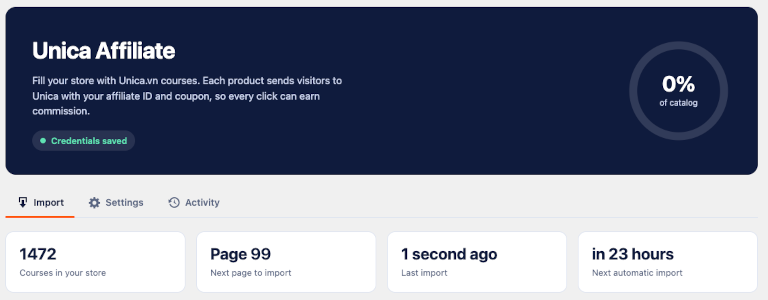
- Progress ring, stats and an activity log of recent imports
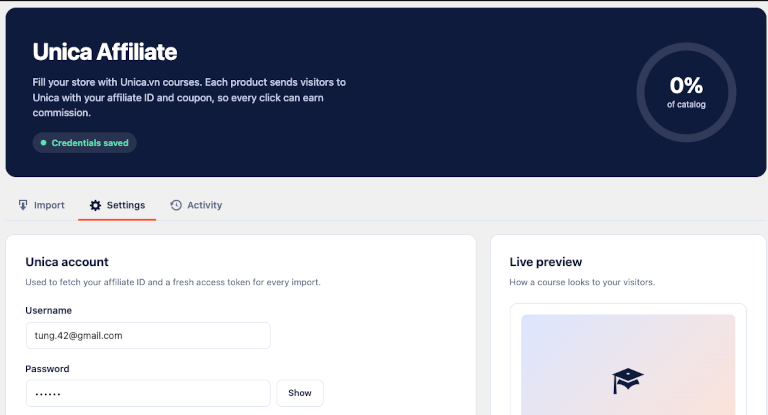
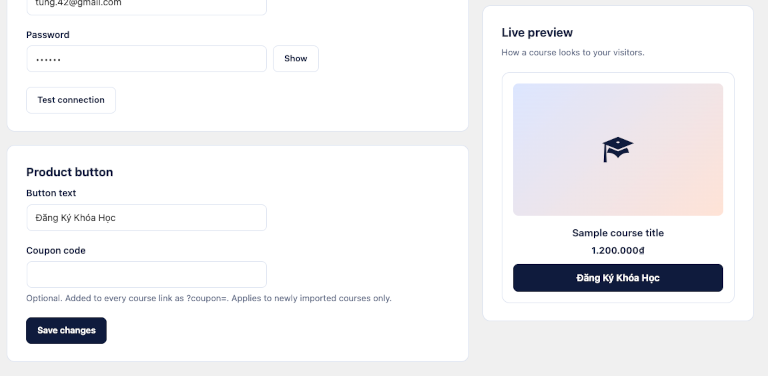
- Test your Unica login before saving
- Custom button text and coupon code, with a live preview
- Automatic daily import that continues from where you stopped
This plugin is not affiliated with or endorsed by Unica.
External services
This plugin connects to the Unica.vn API (https://unica.vn) to fetch course data and your affiliate credentials. It is required for the plugin to work.
POST https://unica.vn/api/getTokensends the Unica username and password you enter in Settings, to obtain your affiliate ID and access token. This happens when you click “Test connection”, import courses, or when the daily import runs.GET https://unica.vn/api/getCourseListandGET https://unica.vn/api/coursessend your affiliate ID and access token to retrieve course data. Course thumbnails are downloaded from Unica and saved to your Media Library.
Service provider: Unica (https://unica.vn). Please review Unica’s terms of use and privacy policy on their website.
Screenshots
Installation
- Install and activate WooCommerce.
- Upload the
unica-woo-affiliatefolder to/wp-content/plugins/, or install it from the Plugins screen. - Activate the plugin.
- Go to Unica Affiliate > Settings, enter your Unica username and password, and click Test connection.
- Open the Import tab and click Import page 1.
FAQ
-
Does this require WooCommerce?
-
Yes. Courses are created as WooCommerce external products.
-
Where is my Unica password stored?
-
In your site’s options table, because it is needed to request a fresh token for each import. It is removed when you delete the plugin.
-
Will it create duplicates?
-
No. Courses are matched by SKU (the Unica course ID) and skipped if they already exist.
-
How do I update courses that are already imported?
-
Turn on Replace existing courses when importing in Settings. Matching courses are then updated with the latest name, description, price, button text and affiliate link. Status, visibility, categories and the current image are kept, and only external products are touched. It applies to manual and daily imports, so switch it off again if you edit imported products by hand.
Reviews
There are no reviews for this plugin.
Contributors & Developers
“Unica Woo Affiliate” is open source software. The following people have contributed to this plugin.
Contributors

Translate “Unica Woo Affiliate” into your language.
Interested in development?
Browse the code, check out the SVN repository, or subscribe to the development log by RSS.
Changelog
2.1.0
- Add “Replace existing courses” option to update courses already in the store instead of skipping them
- Import results now report how many courses were replaced
2.0.6
- Add coupon code to product links
2.0.0
- New admin interface: dashboard, settings with live preview and activity log
- AJAX import with progress, “import all remaining” and test connection
- Fewer API calls per import, safer output escaping, better error handling
- Daily cron scheduled on activation; uninstall cleanup added
1.0.0
- Initial release