Description
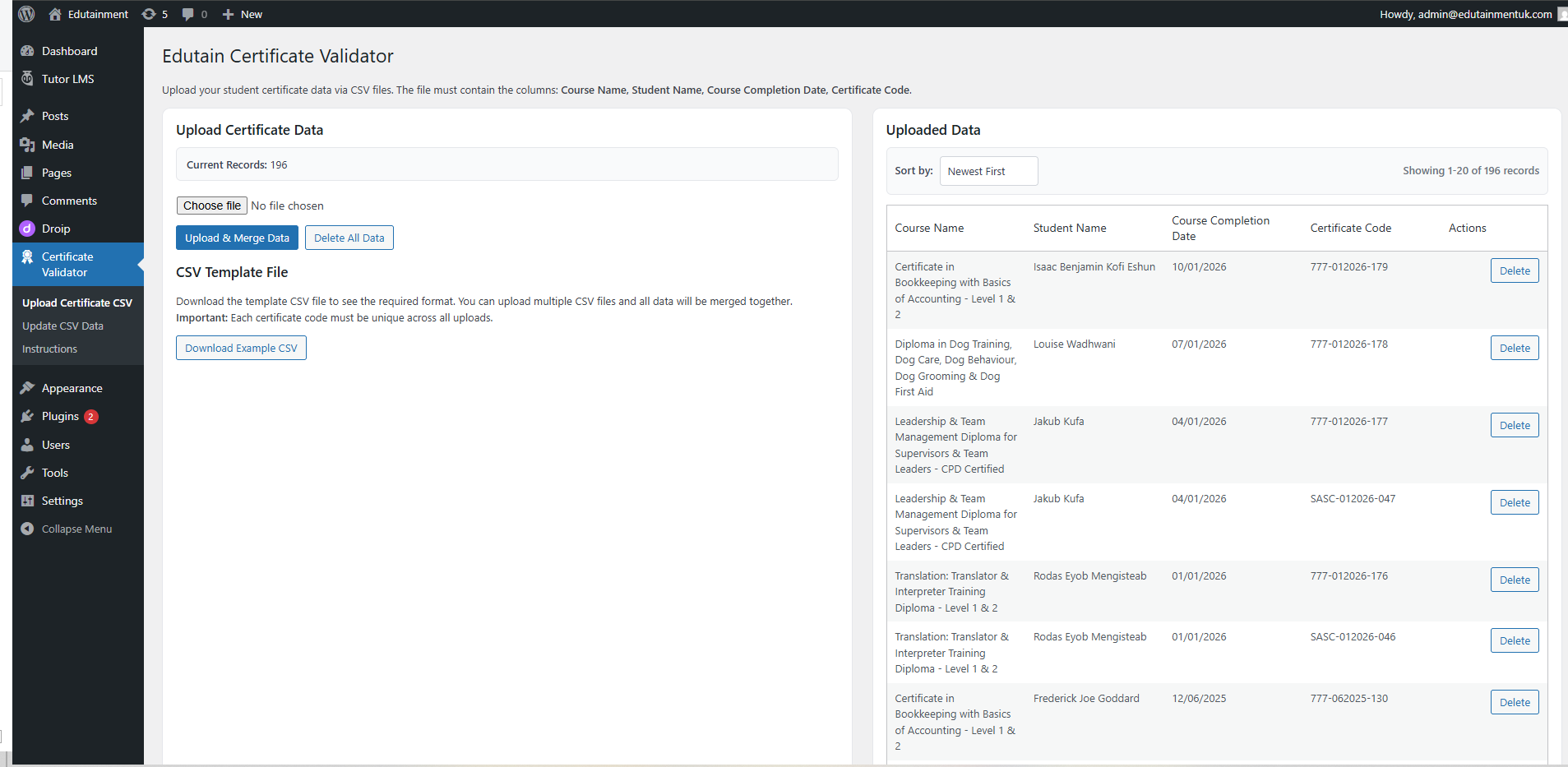
Edutain Certificate Validator adds online certificate verification to your WordPress site without requiring an LMS. Upload certificate records from CSV or add them individually, then let learners, employers and other visitors verify a certificate by entering its unique code.
The core certificate validator is fully functional, unlimited and free. CSV certificate upload, individual record management, CSV/XLSX export and the public verification form are not restricted by Pro.
Free certificate verification features
- Upload and merge certificate records from CSV files up to 10 MB.
- Import up to 100,000 data rows per uploaded file.
- Use four required columns in any order: Name, Authentication Code and Issue Date.
- Optionally store a Email address with each record.
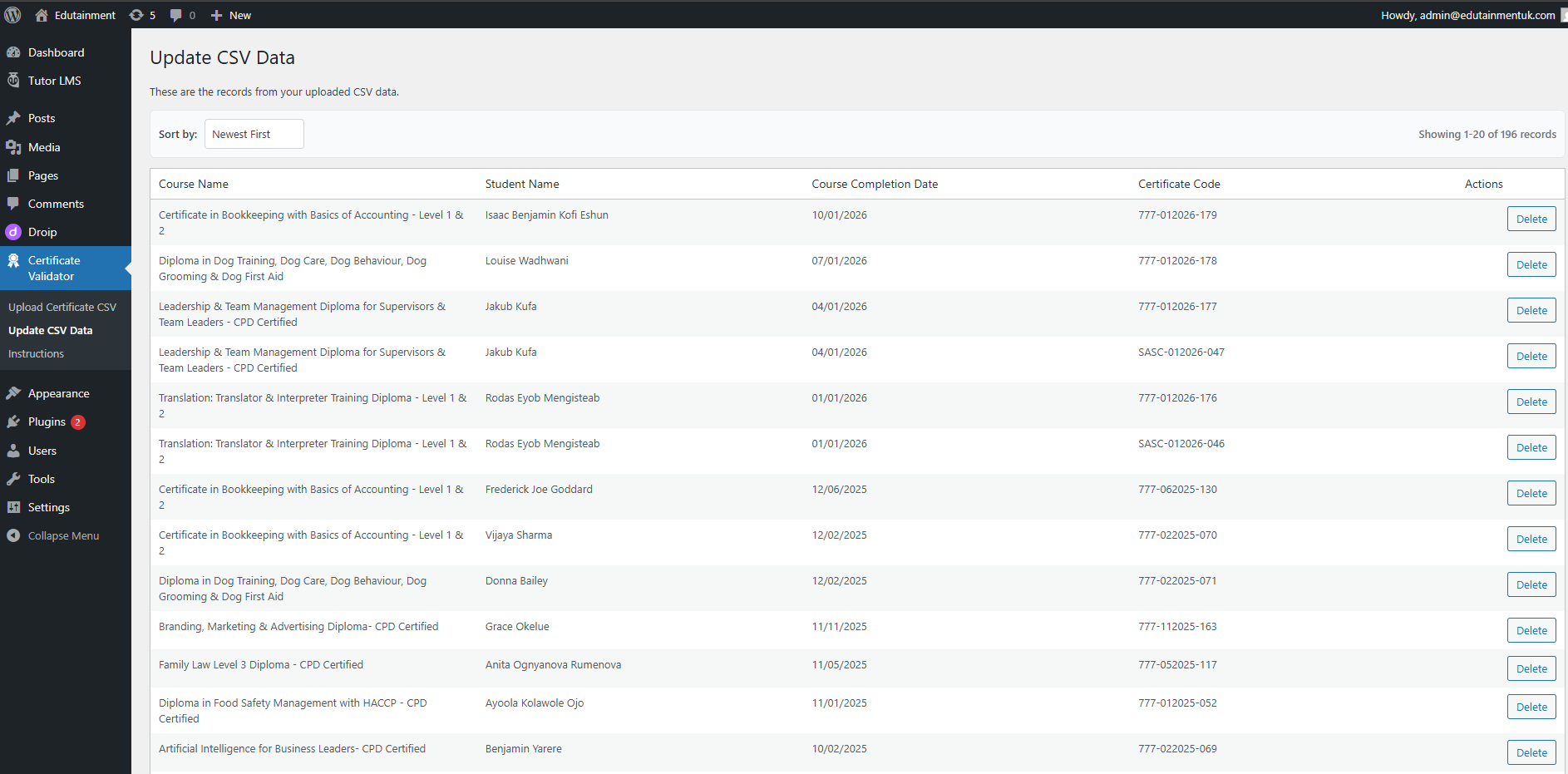
- Add and edit records individually.
- Search, sort and paginate the records table.
- Delete individual records, or delete all records after confirmation.
- Export the complete dataset as CSV or XLSX.
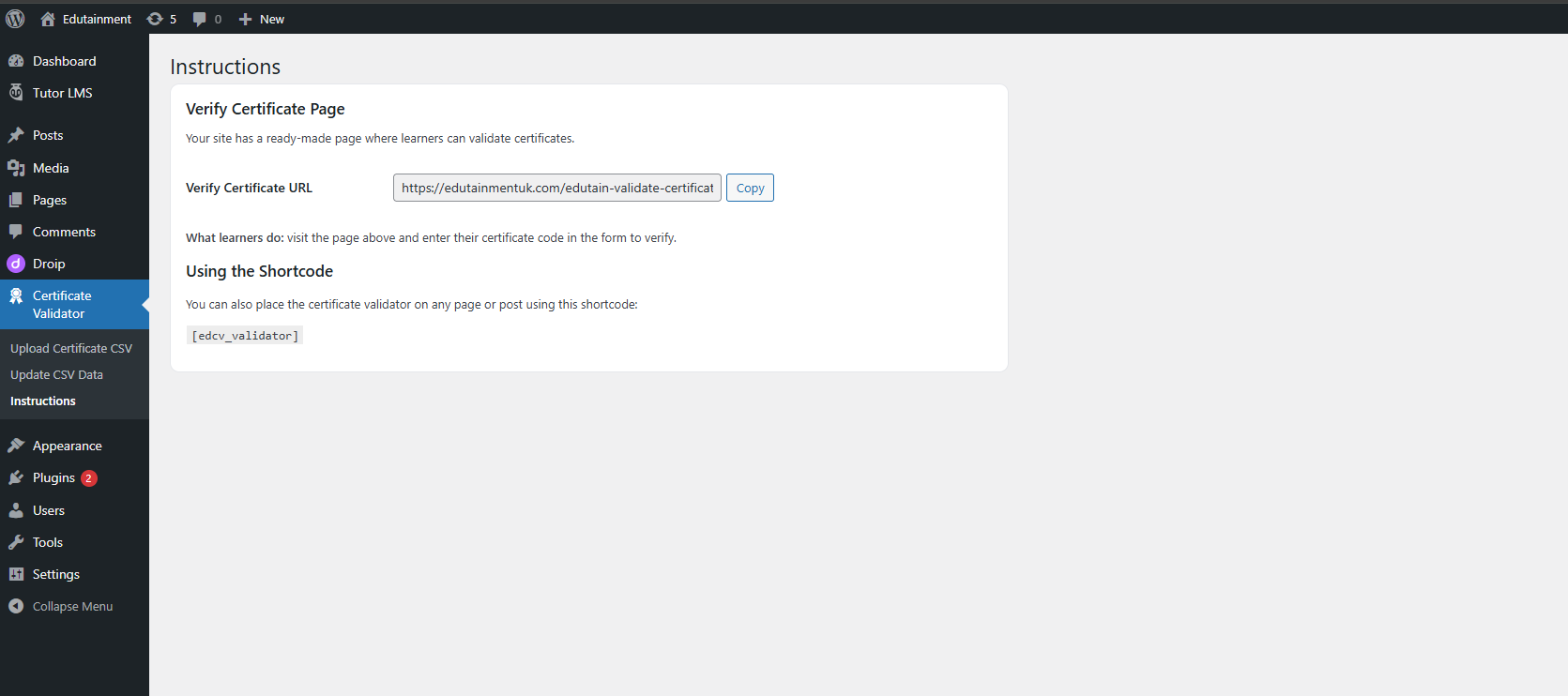
- Use
[edcv_validator]as a certificate verification shortcode on any page or post. - Share direct verification links using
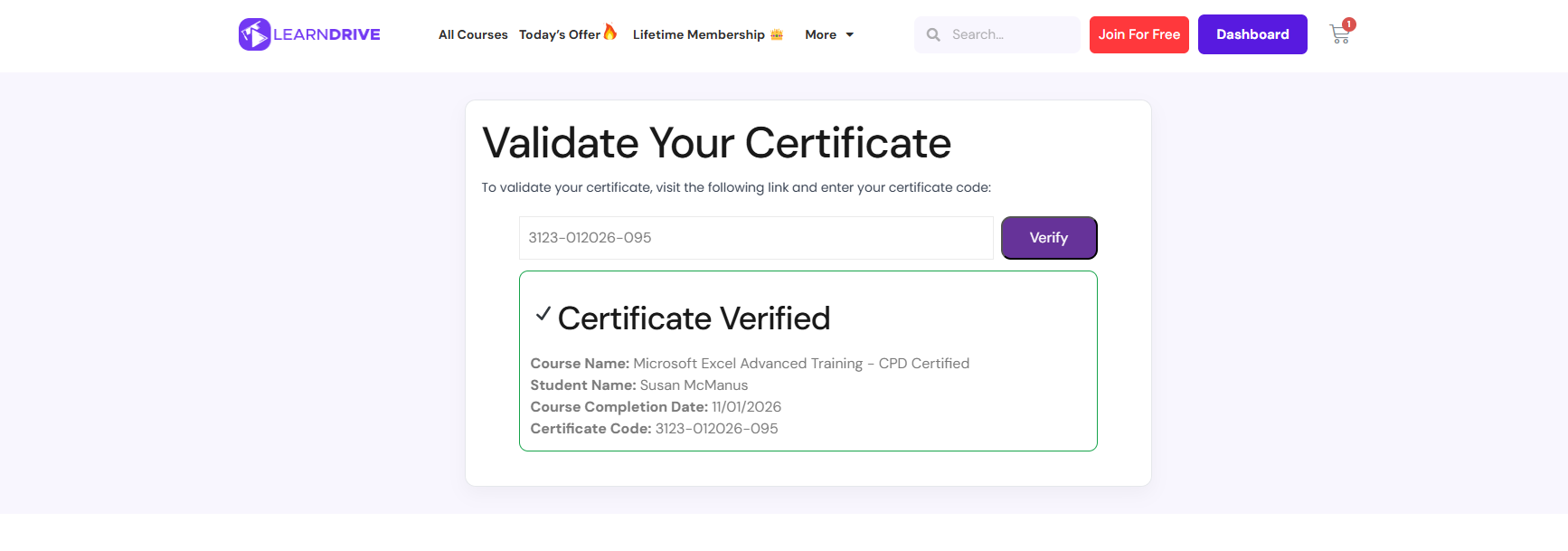
?certificate_code=CODEor?code=CODE. - Display a verification result with the learner name, course, completion date and Authentication Code.
- Let visitors copy a verification link or print the result.
- Limit public verification attempts to reduce automated certificate-code guessing.
- Automatically create a published Validate Certificate page on activation.
- Keep certificate records in a dedicated, indexed WordPress database table.
CSV certificate upload
Your CSV must contain these three headers, in any order and with case-insensitive matching:
- Name
- Authentication Code
-
Issue Date
Email is optional. Issue dates may use
dd/mm/yyyyoryyyy-mm-ddand are stored in ISO format. Authentication Codes must be unique. Duplicate codes and invalid rows are skipped and reported. Duplicate column names stop the import so ambiguous data is not processed.
Free imports accept the core columns only. With Pro active, additional CSV columns can be stored as certificate extras. Expiry Date and Certificate Status are recognised Pro columns; other additional columns become public custom fields, up to 30 custom fields per record.
Pro certificate management features
Pro features are delivered through the licensed Premium edition of Edutain Certificate Validator;Learn more about Pro.
- Generate individual QR codes that open direct certificate verification links.
- Download QR codes as PNG or PDF, create multi-certificate QR PDF sheets, and print QR sheets.
- Generate branded landscape PDF certificates with an optional Media Library logo, accent colour, signature name and embedded QR code.
- Optionally let learners download PDFs from valid public verification results.
- Add expiry dates and mark certificates as valid, revoked or suspended, with an optional status reason.
- Show expired, revoked and suspended states on the public verification result.
- Add up to 30 custom label/value fields per certificate and choose which are public.
- Bulk delete selected records and bulk-set expiry, status, Email or custom-field values.
- Send or resend certificate emails manually using the stored Email address.
- Customise the email subject and message with certificate placeholders.
- Queue bulk email sends in WP-Cron batches of 15 to reduce request timeouts and pressure on host mail limits.
- Log verification attempts and view totals, failed attempts, recent activity and most-verified Authentication Codes.
- Choose a verification-log retention period or retain the log indefinitely.
Email management
Pro email management uses the optional core Email value for each certificate record. The subject and message support these placeholders:
{name} `{course_name}` `{issue_date}` `{authentication_code}` `{verify_link}` `{site_name}`
Bulk sends are queued in the background in groups of 15. They use WordPress WP-Cron, so processing time depends on site traffic and the site’s email configuration. Email is sent through WordPress using wp_mail().
External services
Edutain Certificate Validator integrates services provided by Freemius, Inc. Freemius is used for optional account connection and management, Pro licence activation and entitlement checks, premium software updates, and the Pro checkout process.
The plugin loads the Freemius Checkout JavaScript from https://checkout.freemius.com/js/v1/ on EDCV’s Dashboard, Data Management, dedicated Upgrade, and Freemius Account admin pages, where purchasing or upgrading controls may be needed. This remote script request can occur before a Freemius account connection or licence activation and communicates with Freemius. As with other web requests, Freemius and its infrastructure may receive request information such as the requesting device’s IP address, browser or user-agent headers, and the referring admin-page URL. Opening Checkout sends the selected EDCV product and plan, licence quantity, and billing cycle to Freemius. Contact, billing, payment, tax, and purchase information entered during Checkout is handled by Freemius and its payment providers.
When an administrator chooses to connect a Freemius account, opts into data sharing, activates or manages a Pro licence, uses the Freemius Account screen, checks or receives Freemius-managed premium updates, or interacts with related Freemius notices, the bundled SDK may communicate with Freemius. Depending on the action and permissions shown in the Freemius interface, transmitted information may include:
- The site or homepage URL and site title.
- The WordPress and PHP versions, site language, and multisite or network context.
- The EDCV plugin version, Freemius SDK version, and whether the plugin is active, deactivated, or uninstalled.
- The WordPress administrator’s first name, last name, and email address when connecting an account.
- Freemius user, site, install, product, plan, licence, and activation identifiers, including a licence key when one is submitted.
- Optional diagnostic information, which can include installed plugin and theme names, slugs, versions, and activation states when that permission is enabled.
Freemius presents its connection, licence, and diagnostic permissions in WordPress. Some communication is required to activate and validate a Pro licence or use a Freemius account, while optional diagnostic sharing can be controlled through the Freemius permissions and opt-out controls. Checkout communication occurs when its remote script is loaded and when the administrator opens or completes a purchase. Freemius-managed update checks and installation-state updates may also communicate information needed for licence and update delivery.
No EDCV code path was found that passes learner names, Email addresses, course names, issue dates, Authentication Codes, certificate custom fields, or verification analytics to the Freemius SDK or Checkout configuration. These certificate-related values are used by EDCV’s local database, verification, PDF, QR, analytics, export, and email features instead. This statement describes EDCV’s own integration code and does not replace Freemius’s policies for information processed through its SDK, checkout, account, licence, or update services.
Freemius terms: https://freemius.com/terms/
Freemius privacy policy: https://freemius.com/privacy/
If an administrator configures a certificate logo using an external image URL instead of the WordPress Media Library, the site fetches that image when generating a PDF. The image host may receive normal request information such as the site server’s IP address and request headers. EDCV does not add certificate-record values to the logo request.
Usage
- Install and activate the plugin.
- Open Certificate Validator > Data Management.
- Download the example CSV, upload your completed file, or add a certificate record manually.
- Open the automatically created Validate Certificate page, or add
[edcv_validator]to another page or post. - Give each learner their Authentication Code or a direct verification link.
Privacy
Certificate records, including learner names, optional Email addresses and the optional expiry_date value, are stored in a dedicated table in your WordPress database. Pro expiry logic uses that core expiry_date value. Pro certificate status and custom fields are stored in a separate metadata table.
Public verification compares a submitted Authentication Code with the local certificate table. Rate limiting creates a temporary transient keyed by an MD5 hash of the visitor’s IP address. With Pro analytics active, each verification attempt is stored with the submitted Authentication Code, result, certificate state, timestamp and a salted MD5 hash of the visitor’s IP address. The analytics retention setting controls scheduled deletion; it can also be set to retain logs indefinitely.
Pro email management sends certificate information to valid Email recipients through WordPress wp_mail(). Bulk email jobs store temporary job state in the edcv_pro_email_queue option, including a job identifier, record-scan cursor and maximum record ID, recipient/count progress, status, and timestamps. WP-Cron processes eligible records in batches of 15. Legacy jobs created by earlier 2.0.0 development builds may temporarily retain pending record IDs until those jobs finish or are cancelled. Delivery and any transfer to an email provider depend on the WordPress site’s mail setup.
QR codes and PDFs are generated locally. QR generation uses temporary files that are deleted after use. A PDF logo selected from the Media Library is read from its local attachment file; a manually configured external logo URL is downloaded temporarily during PDF generation and then deleted.
The bundled Freemius SDK provides account, licensing, entitlement, premium-update and Checkout functionality. Its remote Checkout script is loaded on EDCV’s Dashboard, Data Management, dedicated Upgrade, and Freemius Account admin pages where purchasing or upgrading controls may be needed, while account, licence, update and optional diagnostic communication depends on the administrator’s actions and the permissions presented by Freemius. See the External services section for the categories of information involved and links to Freemius’s terms and privacy policy.
Plugin data is retained on uninstall unless the administrator enables the relevant deletion settings. Core certificate data and Pro metadata/analytics have separate opt-in deletion controls.
Installation
- Install Edutain Certificate Validator from the WordPress Plugins screen, or upload the
edutain-certificate-validatorfolder to/wp-content/plugins/. - Activate the plugin.
- Go to Certificate Validator > Data Management to add or import certificate records.
- Confirm the automatically created Validate Certificate page is published, or place
[edcv_validator]on your preferred page. - Optional: enter Email values if you plan to use Pro email management.
FAQ
-
Is the free certificate validator limited?
-
No. The core CSV upload, individual record management, CSV/XLSX export, unlimited stored records and public certificate verification form are available without Pro. A single CSV upload is limited to 10 MB and 100,000 data rows for safe processing; this is an import-operation limit, not a stored-record limit.
-
What columns must my CSV contain?
-
The required columns are
Name,Issue Date(orCompletion Date) andAuthentication Code. Columns can be in any order and header matching is case-insensitive.Emailis optional. -
Which date formats can I import?
-
Completion Date and the Pro Expiry Date column accept
dd/mm/yyyyoryyyy-mm-dd. Invalid calendar dates are skipped and reported. -
Can I upload multiple CSV files?
-
Yes. Each upload is merged into the existing dataset. Existing Authentication Codes are skipped as duplicates and reported.
-
Can I export my certificate records?
-
Yes. The complete dataset can be downloaded as CSV or XLSX. With Pro active, exports also include expiry information and custom fields.
-
Where is certificate data stored?
-
Certificate records are stored in the
{prefix}_edcv_certificatestable in your WordPress database. Pro certificate metadata and verification analytics use separate plugin tables. -
How do visitors verify a certificate?
-
Visitors enter a Authentication Code on the automatically created Validate Certificate page or any page containing
[edcv_validator]. A URL containing?certificate_code=THEIR-CODEor?code=THEIR-CODEpre-fills the form and starts verification automatically. -
Is the public verification form protected against abuse?
-
The verification endpoint is nonce-protected and allows 30 attempts per IP in a fixed 60-second window. Public PDF downloads use a separate limit of 10 attempts per IP in their own fixed 60-second window. Developers can adjust limits with the
edcv_rate_limit_max_attemptsandedcv_rate_limit_windowfilters; trusted hosting environments can provide a validated, server-normalized client IP withedcv_rate_limit_visitor_identity. -
Does the plugin require an LMS or external verification API?
-
No LMS or external verification API is required. Certificate lookup, QR generation and PDF generation run on your WordPress site. Freemius is used for licensing, account and checkout services, and WordPress email delivery depends on your site’s mail configuration.
-
Will the shortcode work with my theme or page builder?
-
Yes.
[edcv_validator]is a standard WordPress shortcode, so it works in the block editor, classic editor and any page builder that supports shortcodes, including Elementor, Divi and Beaver Builder. -
Who can access the certificate admin area?
-
Only Administrators by default. Editors, Authors and other roles cannot see or manage certificate data.
-
How does Pro email management choose recipients?
-
It uses the valid
Emailstored in each core certificate record. Records without a valid email address are skipped. Bulk sends are queued through WP-Cron in batches of 15. -
What does Pro require for QR codes?
-
QR generation requires the PHP GD extension. If GD is unavailable, the plugin shows an administrator notice and does not generate QR images.
-
What happens when a certificate expires or is revoked?
-
With Pro active, the public result changes to show expired, revoked or suspended status. Public PDF download is offered only for certificates whose current state is valid.
-
Do generated PDF certificates support all languages and characters?
-
Generated PDF certificates currently work best with Latin-based text. Unsupported characters in learner names, course titles, issuer names or signature names may be transliterated or omitted in the PDF. Certificate records and the public verification page continue to use WordPress’s normal UTF-8 text handling and do not share this PDF limitation.
-
Will updating from version 1.0 delete existing certificates?
-
No. The plugin migrates the legacy CSV dataset into its database table and keeps a backup under a random filename. Version 2.0.0 also migrates the former Pro
emailmetadata value into the core Email column when available. -
What happens to data when I deactivate or uninstall the plugin?
-
Deactivating leaves everything untouched. Uninstalling also retains data by default. The Data Management page includes an opt-in setting to delete core certificate data on uninstall. Pro settings include a separate opt-in control for deleting Pro metadata, analytics and settings. Review both controls before uninstalling.
Reviews
Contributors & Developers
“Edutain Certificate Validator” is open source software. The following people have contributed to this plugin.
ContributorsTranslate “Edutain Certificate Validator” into your language.
Interested in development?
Browse the code, check out the SVN repository, or subscribe to the development log by RSS.
Changelog
2.0.0
- New: added Email as an optional core certificate field for manual entry, CSV import and record editing.
- New: added complete-record CSV and XLSX exports, including Pro expiry and custom-field data when Pro is active.
- New: added Pro bulk record deletion and bulk field updates.
- New: added Pro QR PNG downloads, QR PDF downloads and multi-record QR PDF sheets.
- New: added tabbed Data Management and Pro Settings workflows.
- New: added Pro manual email management and queued bulk sending from core Email values.
- Improved: added live eligible-recipient counts, a capped recipient preview and loading/error states before a bulk email is queued.
- Changed: Pro features now unlock with a licence key, instead of installing a separate add-on plugin.
- Changed: certificate email sending is manual-only; adding or importing records does not automatically send email.
- Changed: custom fields are limited to 30 per certificate record.
- Improved: CSV imports validate supported date formats, reject duplicate headers and report invalid dates.
- Improved: legacy Pro email metadata is migrated to the core Email column.
- Security: added capability and nonce checks to administrative AJAX operations and retained rate limiting on public verification and PDF endpoints.
- Security: CSV and XLSX exports neutralise cells that could be interpreted as spreadsheet formulas.
- Developer: preserved record lifecycle actions, verification-card filters and configurable rate-limit filters.
- Merged the former Pro add-on into the same plugin product and licence flow.
- Kept CSV upload, record management and public verification free and unlimited.
1.1.0
- Moved certificate data from a legacy CSV file to a dedicated database table, with automatic migration.
- Added the redesigned public verification result, direct verification links and rate limiting.
- Added individual record management, search, sorting and pagination.
- Added drag-and-drop CSV upload, flexible column order and import summaries.
- Added the optional core-data deletion setting for uninstall.
1.0.0
- Initial release.