
Description
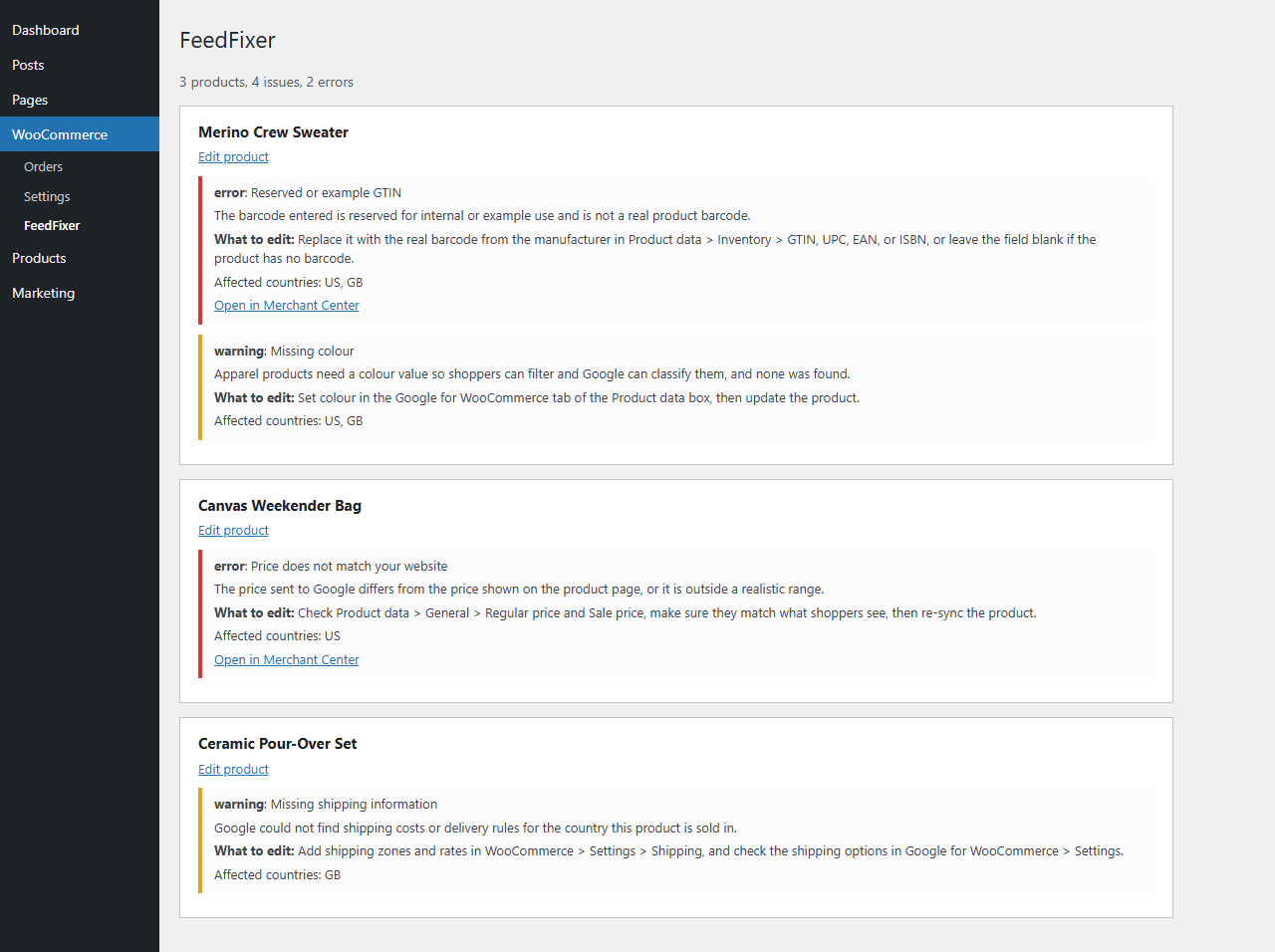
When Google Merchant Center flags a WooCommerce product, the reason is often a short code and a generic action. FeedFixer reads the product issues that the Google for WooCommerce extension already stores on your site and explains each one in plain English: what Google found, and which field to edit in WooCommerce.
- Explains each issue in plain English: the cause, and what to edit
- Groups issues by product, with an “Edit product” link for each one
- Shows the severity (error or warning) and the affected countries
- Links each issue to Merchant Center when Google provides the link
- Read-only: it never changes your products, your feed or your Google account
- No external calls and no sign-in
- Every feature is free, with no time limits and nothing locked
FeedFixer has written explanations for the most common feed problems: missing or invalid GTIN, reserved or example GTIN, invalid UPC, image problems, price or availability that does not match your website, missing shipping information, missing brand, missing or too long titles, missing or too short descriptions, missing Google product category, incorrect product type, apparel attributes (size, colour, gender, age group), landing page problems and policy issues. For any other issue it shows Google’s own text and suggested action.
FeedFixer explains issues; it does not change Google’s decisions.
Requires WooCommerce and the Google for WooCommerce extension.
Privacy
FeedFixer makes no external calls and sends no data anywhere. It is read-only: it reads the issues the Google for WooCommerce extension already stores in your database. It does not collect or transmit personal data. On uninstall it removes only its own feedfixer_ options.
Screenshots
Installation
- Install and activate WooCommerce and the Google for WooCommerce extension, and let it sync with Merchant Center.
- Upload the
feedfixerfolder to/wp-content/plugins/, or install it from the Plugins screen. - Activate FeedFixer.
- Open WooCommerce > FeedFixer.
FAQ
-
Does it change my products or my feed?
-
No. FeedFixer is read-only. It shows what to edit; you make the changes yourself.
-
Does it connect to Google?
-
No. It makes no external calls and asks for no sign-in. It only reads what Google for WooCommerce has already stored on your site.
-
Which issues does it explain?
-
GTIN and UPC problems, images, price and availability mismatches, shipping, brand, titles, descriptions, Google product category, product type, apparel attributes, landing pages and policy issues. Any other issue is shown with Google’s own text and suggested action.
-
Does it work with other product feed plugins?
-
No. FeedFixer reads only the issues stored by the Google for WooCommerce extension.
-
Why does it say there are no issues, or that data is missing?
-
The Google for WooCommerce extension may be inactive or not yet synced. FeedFixer shows a notice when the data is not available.
-
What happens if Google for WooCommerce changes how it stores issues?
-
FeedFixer checks the format first. If it changed, FeedFixer shows a notice naming what is missing instead of showing wrong information.
-
Is anything paid?
-
No. Every feature is free.
Reviews
There are no reviews for this plugin.
Contributors & Developers
“FeedFixer” is open source software. The following people have contributed to this plugin.
Contributors
Translate “FeedFixer” into your language.
Interested in development?
Browse the code, check out the SVN repository, or subscribe to the development log by RSS.
Changelog
0.1.0
- Initial release.